38 posts tagged with "whats-new"

View All Tags

What's New? Quarterly Release 24.5 Enceladus

· 5 min read

Written by Callum Sinclair - Product Engineering Manager.

This article covers what's new in our latest Quarterly release series from March 2024 to May 2024. Read the release notes here.

Comet 24.5.0 Enceladus

We're very pleased to announce our latest Quarterly release series - Comet 24.5 Enceladus. This is the the latest entry in our quarterly rollup series, that branches off from our main rolling Voyager development into a fixed target for you to qualify and build your service offering upon.

Enceladus is a moon of Saturn and is named after the giant Enceladus of Greek mythology. There are a few worlds that are thought to have liquid water oceans beneath their frozen shell, but Enceladus sprays its ocean out into space where spacecraft can sample it. From these samples, scientists have determined that Enceladus has most of the chemical ingredients needed for life, and likely has hydrothermal vents releasing hot, mineral-rich water into its ocean. Enceladus is about as wide as Arizona, and it also has the most reflective surface in our solar system. Because it reflects so much sunlight, the surface temperature is extremely cold, about minus 330 degrees Fahrenheit (minus 201 degrees Celsius).

For users coming from the previous 24.2 Mimas quarterly release series, Enceladus adds 6 new features and 38 enhancements. Some of the new features we are excited about are:

  • Hyper-V Changed Block Tracking (CBT) support
  • Impossible Cloud Storage Templates
  • SMB Storage Vaults
  • Comet Backup desktop app Protected Item wizard refresh
  • Syncro integration
  • Server Self Backup enabled by default

The full set of changes can be found in the release notes.

Webinar announcement

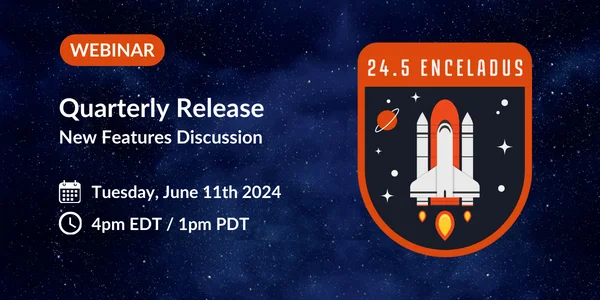
If you'd prefer to watch rather than read, we're hosting a webinar to discuss this new quarterly release and all the new changes. Please register before we go live on Tuesday 11 June (4pm EDT / 1pm PDT) to catch up on all the latest Comet news with Comet's CTO, Mason - and as usual, there will be time for a live question-and-answer session at the end of the presentation.

As well as that, we have many more videos available on our YouTube channel, including guides on getting started with Comet, individual features, demonstrations with our technology partners, and webinars for previous quarterly software releases.

Microsoft Office 365 Protected Item Performance Improvements

Over this month, we have made significant improvements to the backup performance of our Microsoft Office 365 Protected Item. These performance improvements mean the backup job completes faster, as well as reduces the amount of data we need to upload. We expect partners to see Microsoft Office 365 Protected Items finish up to 30 times faster.

Disk Image Drive Letter Selection

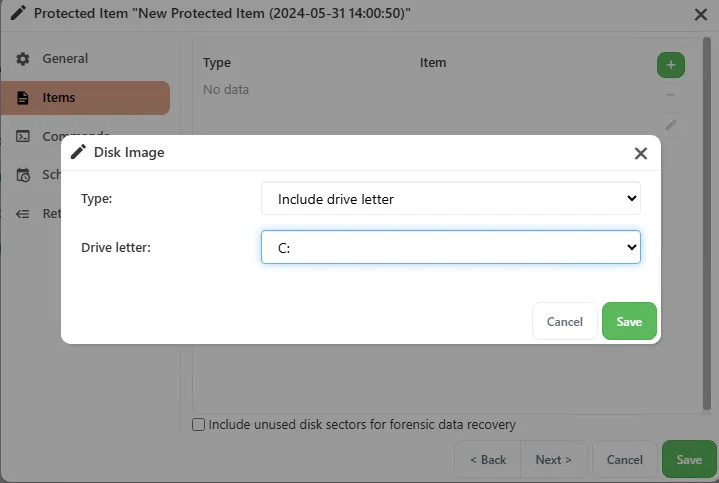
When configuring a Disk Image Protected Item in the Comet Server web interface, it can be difficult to configure when the device is not currently connected to the Comet Server. To help partners configure a Disk Image Protected Item more easily, we have added a new option to select disks to protect by drive letter.

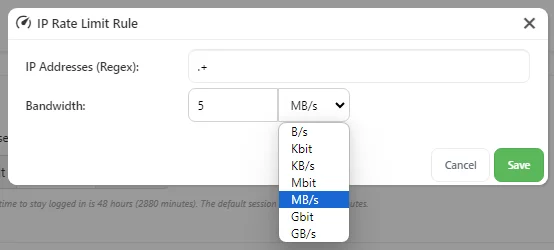
Bulk Upgrade CPU Limits

Our Bulk Upgrade feature is a great way to keep Comet Backup desktop app installs up to date with the latest version that the Comet Server is running. However, for Comet Servers with many tenants using custom branding, a Bulk Upgrade campaign to upgrade older clients consumed significant CPU time building new client installers quickly.

In Comet 24.3.8 we added a new configuration option to limit the maximum number of CPU cores Comet can use during a Bulk Upgrade campaign. This is a fantastic improvement as it reduces the burden on system resources during a Comet Server upgrade. It also provides a more robust Bulk Upgrade campaign, as Comet Backup desktop app installs can be upgraded without overwhelming the Comet Server's resources. For more information, you can check out our documentation here.

Windows System Backup Protected Item - Deprecation Notice

Our Windows System Backup Protected Item is being deprecated. Before we added our Disk Image Protected Item, Windows System Backup Protected Item was a great way to backup and restore entire Windows disks. However, it required spool space (temporary storage) to be able to perform this backup. This means for a 500GB disk, Comet requires an additional 500GB of free space for this Protected Item to work.

Because of this limitation, and how difficult it is to setup, we have always recommended partners use our Disk Image Protected Item. To assist partners through this change, we have built a Windows System Backup to Disk Image conversion tool. For more information, you can see our documentation on the tool here.

We will be removing this Protected Item in November (Comet Release 24.11).

April 2024: What's New?

· 4 min read

April 2024: What's New?

Written by Callum Sinclair - Product Engineering Manager

What's New? is a series of blog posts covering recent changes to Comet in more detail. This article covers the latest changes in Comet over April 2024.

There were three Comet releases during April - two in the Voyager release series, plus one update for our Mimas release series.

We've landed a few large and exciting features this April:

Hyper-V CBT (Changed Block Tracking)

Hyper-V CBT is now available in our Voyager series. Hyper-V CBT performs efficient backups of Hyper-V Virtual Machines by only reading blocks of a virtual disk that have changed since the last backup job. This means Comet only needs to upload the data that has changed inside the VM without having to read and upload every byte.

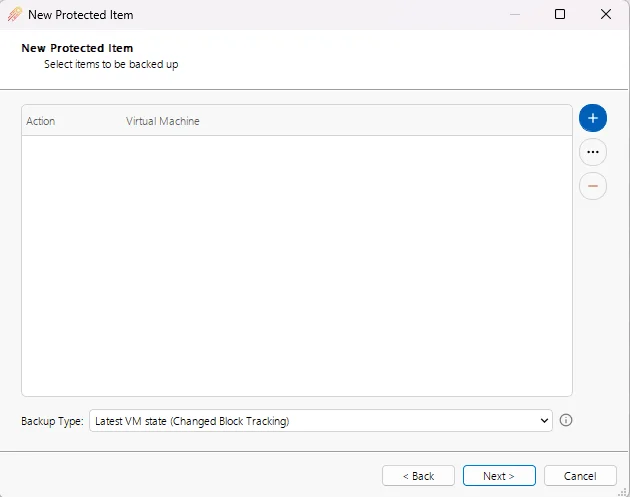
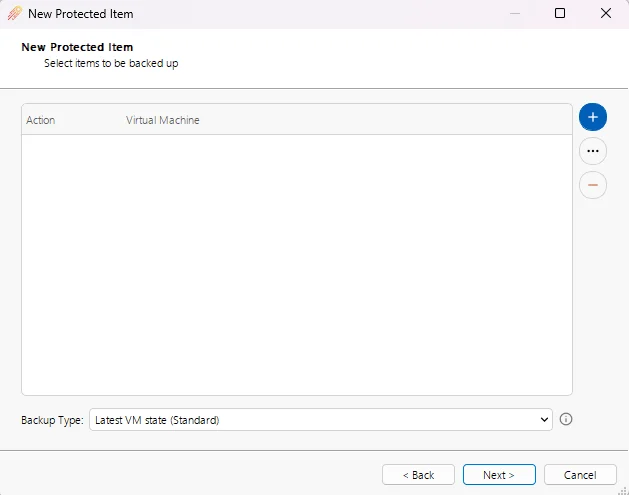
You will find two new Hyper-V Backup Mode types when setting up a Hyper-V Protected Item. These are Latest VM State (Changed Block Tracking) and Latest VM State (Standard). You can read more about what these new modes do in our documentation here

Under the hood our two new Hyper-V Backup Mode types use WMI (Windows Management Instrumentation) and RCT (Windows Resilient Change Tracking) to perform the backup. This is a completely new way for Comet to backup Hyper-V VMs as our old implementation used Windows VSS (Windows Volume Shadow Copy Service).

New Hyper-V Backup Option One: Changed Block Tracking using WMI and RCT

New Hyper-V Backup Option One: Hyper-V Backup using WMI

Hyper-V Changed Block Tracking Using

This enhancement improves our Hyper-V backup offering, ensuring faster backups of your Virtual Machines while also needing to upload less data.

Impossible Cloud Storage Templates

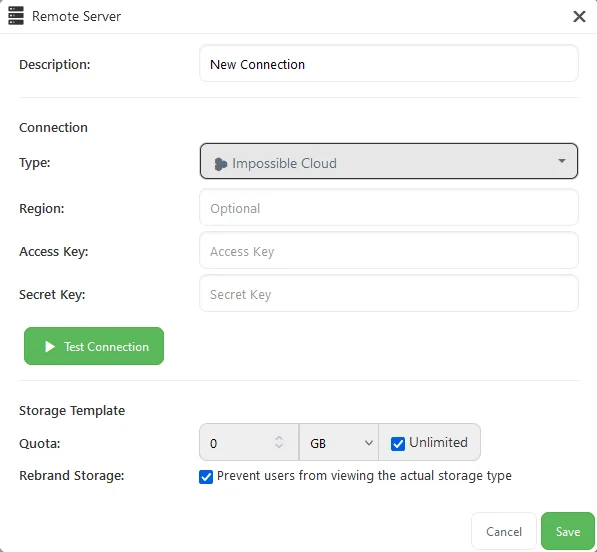
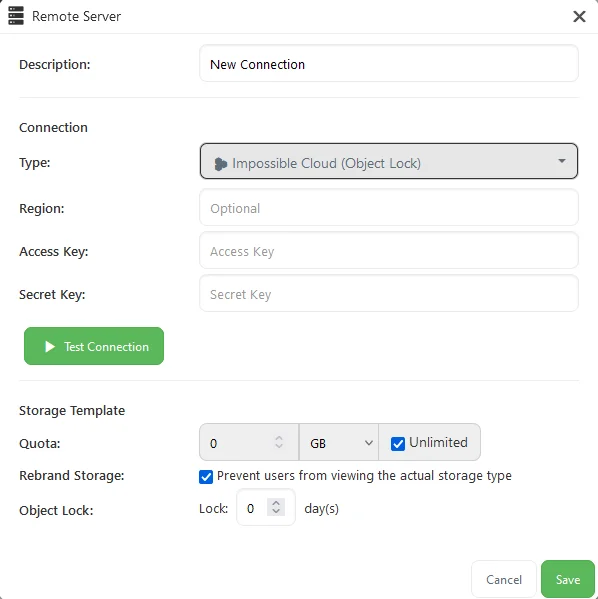
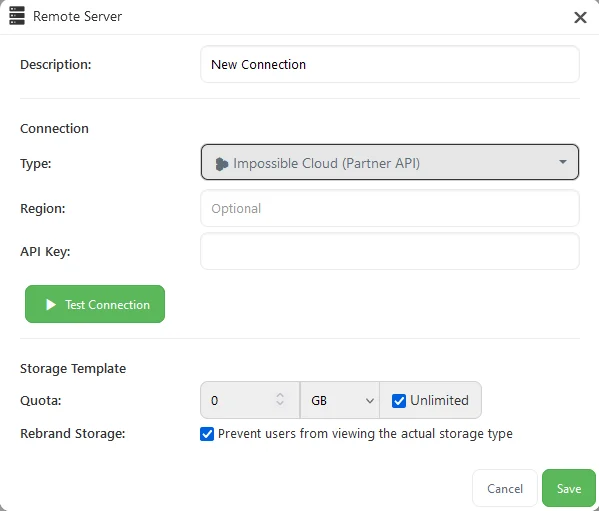
We're pleased to announce that Impossible Cloud is now available as a built-in Storage Template in our Voyager series. If you enter top-level credentials into the Storage Template, Comet can use them to provision private buckets with separate credentials for each user, allowing seamless direct-to-cloud backup.

Impossible Cloud IAM Storage Template

Impossible Cloud IAM Storage Template with Object Lock

Impossible Cloud Partner API Storage Template

As a quick reminder - when using the Storage Templates, it's likely you'll want to configure cleanup for cloud buckets that are no longer being used by any user account. Comet's solution for this problem is called Constellation Role, and it's available from the settings page of your Comet Server. In Constellation, you can enter the same credentials for it to search through. When a Constellation report runs, it finds all your buckets; checks all the user accounts; cross-references the users' Storage Vaults with the available buckets; and deletes any discovered buckets that are not in use by any user account.

Constellation Role is designed to scale up to clusters of multiple Comet Servers, with any mix of server replication, Storage Role, or direct-to-cloud buckets created by the Storage Template feature. You should have exactly one Constellation Role server amongst your entire cluster of Comet Servers.

Comet-Hosted Single Sign On

Users can now sign into Comet-Hosted servers using their account.cometbackup.com accounts. This feature simplifies access to Comet-Hosted servers, allowing users to utilize their existing Comet Backup account credentials for authentication. To enhance security, users are encouraged to set up two-factor authentication (2FA) on account.cometbackup.com.

This feature has already been enabled, and will be used the next time you click the login button from the My Services page on account.cometbackup.com.

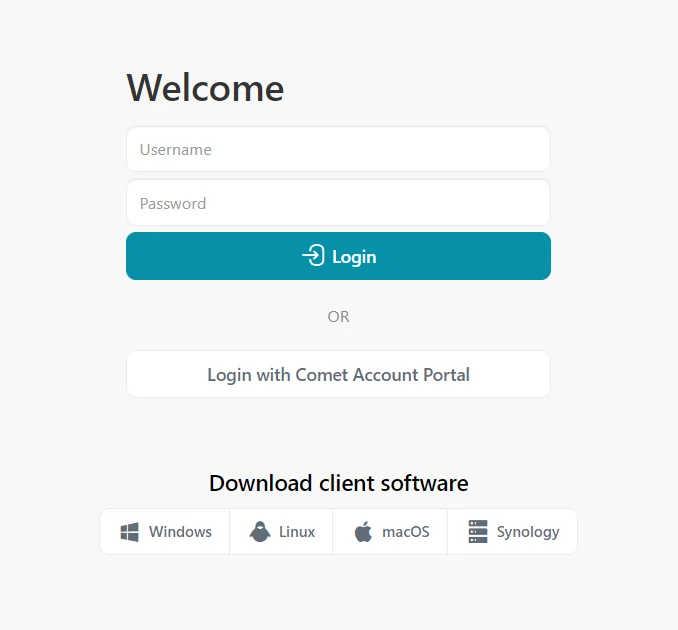
In addition, once you have clicked the login button on the My Services page you will notice the new "Login with Comet Account Portal" button appear on the login screen of your Comet-Hosted server. This button will only appear on browsers where you have clicked the My Services login button before. We have done this to ensure we don't break any rebranding you have configured by showing a big "Login with Comet Account Portal" button.

Comet-Hosted London Region Now Available

We are pleased to announce that Comet-Hosted is now available to be hosted in the London region. Comet users now have the choice of four geographically diverse locations to choose from when selecting where their Comet-Hosted server should be located.

Continued Comet Improvements

Throughout April, we rolled out over twenty fixes and enhancements aimed at improving the overall quality and performance of Comet. These updates underline our commitment to providing a reliable and efficient backup solution for our users.

March 2024: What's New?

· 5 min read

March 2024: What's New

"What's New?" is a series of blog posts covering recent changes to Comet in more detail. This article covers the latest changes in Comet Voyager over March 2024.

There were six Comet releases during March - four in the Voyager release series, plus two updates for our Mimas release series.

We've landed a few large and exciting features this March:

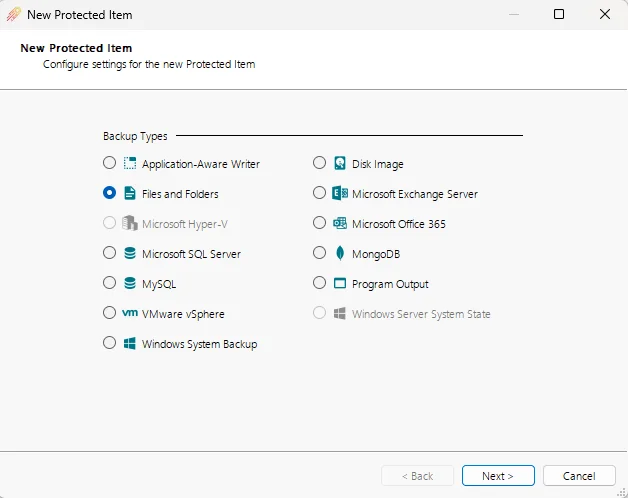
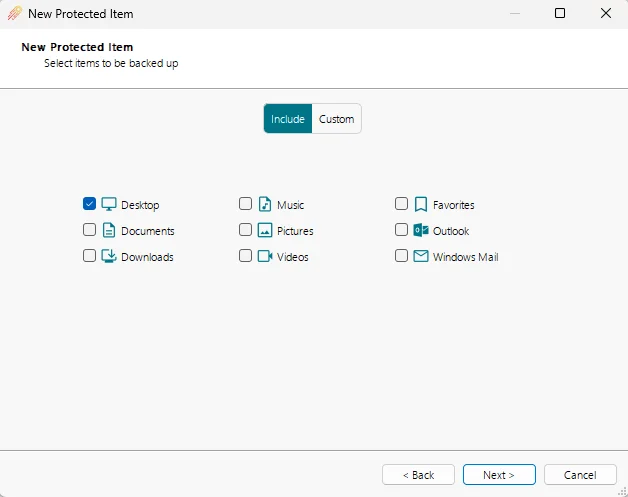
New Protected Item Wizard for the Comet Backup Desktop App

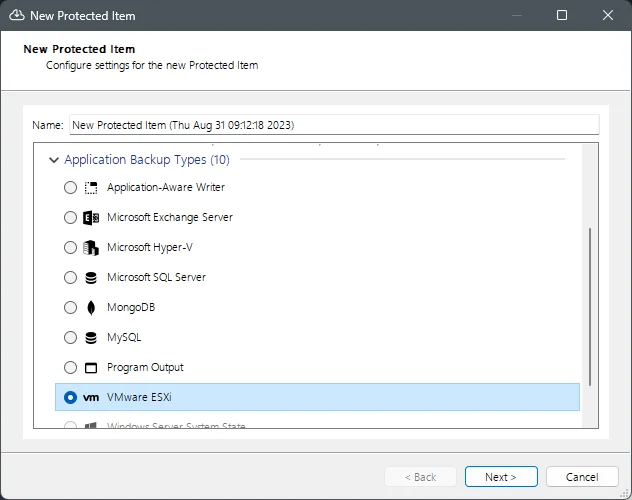
We have overhauled our Protected Item Wizard for the Comet Backup desktop app. As part of this refresh we have moved the section where you name your Protected Item to the end, along with a nice summary of what you have configured to back up.

Each step of the Protected Item Wizard has had new styles applied to it, and below are some of the major differences you will see in new versions of the Comet Backup desktop app.

New Layout for Protected Item Types

New Theme for Protected Item Wizard

Summary of Protected Item Settings

Granular Restore Picker Performance Improvements

We have significantly improved the performance of browsing files and folders during a granular restore from Disk Image, Hyper-V, or VMware Protected Items. These improvements have significantly improved the responsiveness of the file browser when selecting files and folders to restore, particularly on slow or high-latency connections. Prior to 24.3.2, the file browser would have to wait for data to be retrieved from the Storage Vault every time a disk or folder was expanded, which could cause multiple second loads on slower connections. In 24.3.2 and newer, Comet has to retrieve new data much less frequently, significantly reducing the time spent waiting for folder contents to load.

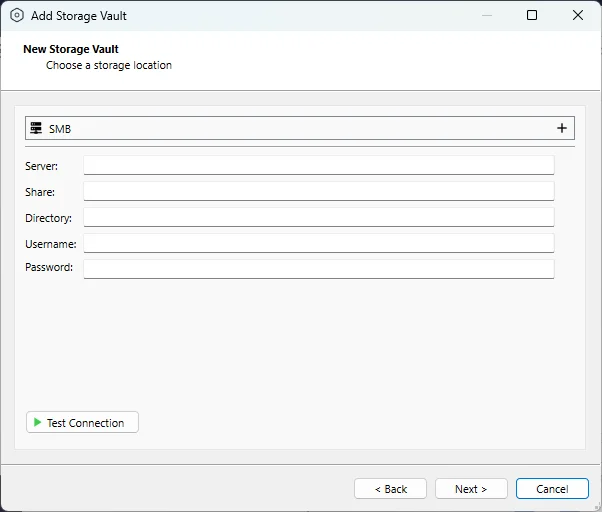
SMB Storage Vault

We have added a new Storage Vault type to make use of network file shares using the SMB protocol. This is a fantastic addition to our Storage Vault offerings, as you can now backup to and restore from network file shares inside your infrastructure that use the SMB protocol.

If you are looking to back up data to your local NAS, check out our new SMB Storage Vault offering.

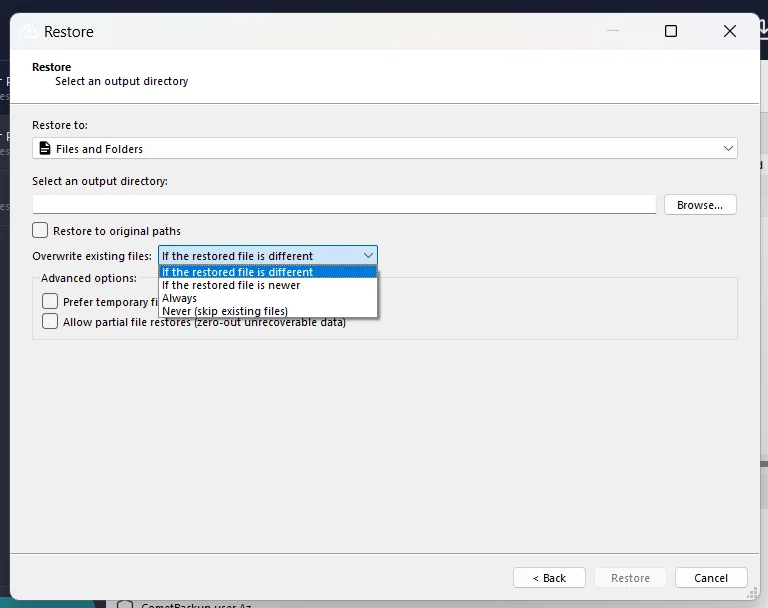
New Restore Option: Overwrite only if files are different

When restoring data with Comet, you will find a new restore option "If the restored file is different". When this option is set, Comet will only restore the file to the location if the file contents are not the same. If the same file already exists in the restore location, Comet will not need to do anything.

This is also useful for times when you want to quickly revert the contents of a folder to a previous snapshot, as Comet will only need to download and restore what changed between the two points in time.

Prevent Admin Accounts from Deleting Storage Vaults

Admin policies and permissions continue to be improved and expanded in our latest releases. You can now lock down admin accounts from being able to delete users storage vaults. This adds an additional layer of security and protection to your Comet accounts.

You can find these settings when editing an admin account on the Comet Server web interface.

Comet Backup now logs to the macOS Console app

The macOS Console app provides crash reports and live log messages of the running processes on your Mac. We have added support for the Comet Backup desktop app to write log message to the Console app. This is a huge improvement to being able to audit what is happening with Comet Backup on macOS, as well as making it easier to troubleshoot issues when they occur.

Server Self-Backups Enabled By Default

Having a Server Self-Backup provides peace of mind that you can recover a Comet Server from a number of disastrous situations. This includes being able to restore a Comet Server in the event critical settings are changed causing outages within your Comet environment.

For new installations of a Comet Server, the Server Self-Backup feature is now enabled by default. Comet strongly recommends moving the backup from the default location (the server installation directory) to somewhere safer, preferably offsite so you can recover from disaster situations.

If you haven't configured Server Self-Backup on your Comet Server yet, you can find the steps to set this up in our documentation

IAM-compatible Storage Template Enhancements

Comet Server supports backing up data to many different storage locations. Comet Server system administrators can configure storage in the client's settings; or server-side with Storage Role; or for supported storage providers, you can configure the Storage Templates feature to provision private, direct-to-cloud credentials for customer backup storage. This provides ease of use and high performance - as long as the storage provider has a compatible integration with Comet Server.

For the long-tail of other providers, we support Custom Remote Bucket and Custom IAM-Compatible as extension points to integrate with the Storage Templates feature. During March, in Comet 24.3.3, we improved the Custom IAM-Compatible Storage Template feature to support many new capabilities, including Object Lock support; the option to create buckets in custom S3 regions; and the option to choose whether the provisioning action creates individual buckets or private subdirectories.

These three new enhancements extend Comet Server's IAM compatibility, and ensure that you can use the Custom IAM-Compatible Storage Template feature with more of the IAM-compatible storage providers on the market.

What's New? Quarterly Release 24.2 Mimas

· 6 min read

This article covers what's new our latest Quarterly release series from December 2023 to February 2024. Read the release notes here.

Comet 24.2.0 Mimas

We're very pleased to announce our latest Quarterly release series - Comet 24.2 Mimas. This is the the latest entry in our quarterly rollup series, that branches off from our main rolling Voyager development into a fixed target for you to qualify and build your service offering upon.

Mimas is named after a moon of Saturn, which in turn takes its name from an ancient Greek mythological giant. Mimas is relatively small compared to Earth's moon, with a diameter of about 396 kilometers (246 miles). Its composition is primarily made up of water ice with a small amount of rocky material. Its most distinguishing feature is a giant impact crater which stretches a third of the way across the face of the moon, making it look like the Death Star from "Star Wars."

For users coming from the previous 23.11 Saturn quarterly release series, Mimas adds 3 features and 15 enhancements, including Dark Mode for the Comet Server web interface and a Debian installer for the Comet Backup desktop app as mentioned below.

The full set of changes can be found in the release notes.

Webinar announcement

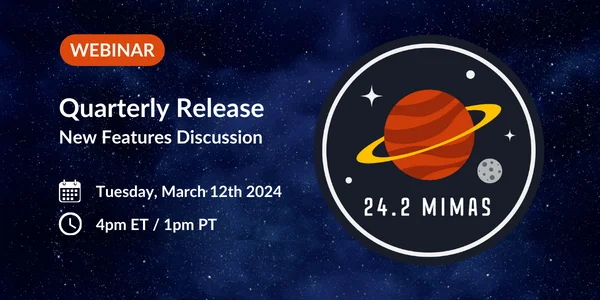
If you'd prefer to watch rather than read, we're hosting a webinar to discuss this new quarterly release and all the new changes. Please register before we go live on Tuesday 12 March (4pm ET / 1pm PT) to catch up on all the latest Comet news with Comet's CTO, Mason - and as usual, there will be time for a live question-and-answer session at the end of the presentation.

As well as that, we have many more videos available on our YouTube channel, including guides on getting started with Comet, individual features, demonstrations with our technology partners, and webinars for previous quarterly software releases.

Dark Mode for the Comet Server

To continue our visual improvements to the Comet Server web interface we have added Dark Mode support. This completely overhauls the look and feel of the Comet Server and automatically applies based on the theme you have chosen for your system. Next time you have a chance check it out by logging into your Comet Server and clicking the new toggle button in the top right corner.

Light Mode:

Dark Mode:

Debian Installer for the Comet Backup desktop app

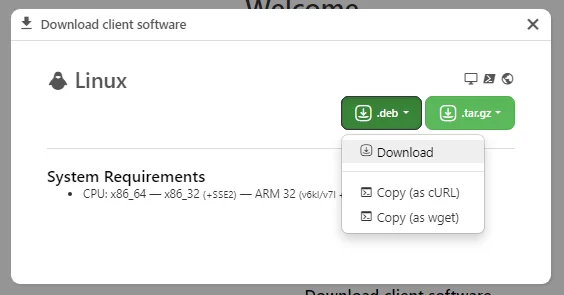
To make it easier to install Comet on your Debian Linux installs, we are pleased to announce our new Debian Installer. Our new installer will walk you through all of the required steps to install Comet. Comet is installed as a systemd service meaning it will now automatically start when your device boots.

Once installed you can still upgrade Comet remotely using the Comet Server web interface meaning you now have multiple options for managing, installing and upgrading Comet on your Linux devices.

Improved S3-compatible Object Lock Performance

Object Lock is a great way to add additional security to your data stored in an S3-compatible Storage Vault. This month we've been hard at work finding ways to optimize Comet's performance when backing up to an S3-compatible Storage Vaults. We have found a way to significantly decrease the time taken to extend the object lock duration on objects stored in the vault. As a result, backup jobs to an S3-compatible Storage Vault now complete up to 16 times faster than before.

Custom Headers added for Custom Remote Buckets

Comet has a great list of S3-compatible storage providers that we have storage templates for. To add better support for other S3-compatible storage providers you can now add Customer Headers to a Custom Remote Bucket in the Comet Server web interface. This greatly expands your options for which provider you would like to use as you can now add additional data such as long lived authentication tokens as part of the request Comet makes when connecting to the storage provider.

Faster Logins between the Comet Account Portal and Comet Hosted

Once Comet Hosted is running our new 24.2.0 Mimas release, we will enable the overhauled login button for Comet Hosted servers from the Comet Account Portal.

The new login button shares credentials between the Comet Account Portal and Comet Hosted meaning you no longer need to remember two sets of passwords. Because of this we have been able to solve all of the failing cases and can provide you with a reliable login experience for your Comet Hosted servers.

Once you've logged in with the new system for the first time, when you log out of your Comet Hosted Server you will see a new Login with Comet Account Portal appear on the login page. This allows you to jump straight back into your Comet Hosted server faster than ever before. This button will only appear on web browser sessions that remember you've clicked the login button from the Comet Account Portal first to ensure we don't show Comet branding to unexpected users of your Comet Hosted Servers.

VM Pricing Adjustments

At Comet, we are committed to continuously improving our products and services to meet your evolving data protection needs. In order to do this, occasionally we find it necessary to make adjustments to our product offerings. We are updating our pricing structure in order to further standardize our virtual machine protected item types – VMware and Hyper-V.

Effective February 28th 2024, we are introducing a new unlimited guest license option for VMware, priced at $39. If you have 8 or more VMware guests backing up, you will automatically get the unlimited pricing; no action needed on your part. This change supports your business growth as you scale and add VM deployments.

Also as of February 28th 2024, we are dropping the $2 base charge for Hyper-V. You will only pay the booster charge for all virtual environment backups (both VMware and Hyper-V) going forward.

To bring our virtual machine licensing into alignment, starting February 28th 2024, Hyper-V licensing will be charged at $3 per guest or $24 for unlimited guests per host.

January 2024: What's New?

· 2 min read

"What's New?" is a series of blog posts covering recent changes to Comet in more detail. This article covers the latest changes in Comet Voyager between December 2023 and January 2024.

There were nine Comet software releases between December 2023 and January 2024 - five in our 23.12.x Voyager release series and four point releases for our 23.12.x Saturn quarterly series.

Over the past nine releases we have released close to 20 bug fixes based on your feedback and our own internal quality standards. We are proud of the hard work the team has put in to make our latest versions of Saturn and Voyager our best releases yet.

Easier user creation in the Comet Server web interface

We've enhanced the way admins can create new users from the Comet Server web interface by allowing users to be created in any tenant. Previously this functionality was only available using the Comet Server API so it is great to be able to provide this functionality for all users.

It is also easier to add multiple users at once in the Comet Server as we've made the add multiple users workflow always visible. Previously this was hidden behind our advanced options settings system which made it harder to discover.

Tenant Visibility on the Users Page

On Comet Servers with more than one tenant configured, it was hard to see what user belonged to what tenant from the Users page. You could see that the user belonged to a tenant, but you could not tell which one.

Now on the users page you can see what tenant a user belongs to right from the page. This is a massive quality of life improvement for admin users.

Along with this improvement we have also made it possible to search for users by tenant name.

VMware Improvements

In November we launched our VMware Protected Item and over the past two months we've been hard at work to improve it based on your feedback, including improved performance, compatibility, and correctness.

The latest versions of Saturn and Voyager are up to date with our latest improvements and we've seen great uptake of the new feature.

Java SDK

You can now natively integrate with a Comet Server from a Java application with our new SDK. You can check it out at our public GitHub here.

November 2023: What's New?

· 7 min read

"What's New?" is a series of blog posts covering recent changes to Comet in more detail. This article covers the latest changes in Comet Voyager over November 2023.

There were seven Comet software releases during November - four in our 23.9.x Voyager release series, two point releases for our 23.8.x Adrastea quarterly series, and the official launch of our latest 23.11.0 Saturn quarterly release.

VMware ESXi Free edition support

Last month, we launched our newest Protected Item type to add support for backing up VMware virtual machines using Comet. Over the last month of Voyager series releases, we've seen great uptake of the new feature and have been working to improve it based on your feedback, including improved performance, compatibility, and correctness.

The VMware vSphere hypervisor platform encompasses both the ESXi hypervisor as well as the vCenter centralized management application. ESXi is available in multiple licensed editions, including a free license with various limitations such as restrictions on the number of virtual CPUs that can be assigned to a given virtual machine.

In our first release, Comet supported ESXi versions with a paid license ("vSphere Essentials" or higher), but in the latest Comet 23.9.11 we took a closer look at the problem, and have extended our compatibility to include support for the free version of VMware ESXi. Our implementation supports the same versions (6.7, 7.x, 8.x) of ESXi and is built solely using VMware's officially supported vSphere VADP backup APIs, including Changed Block Tracking (CBT) support. No configuration changes are required to your free-license ESXi host server to support this backup mode.

Improved restores

As part of working on virtual machine features this month, we put a particular focus on the granular restore option. The existing granular restore mode in Comet allows you to take a virtual disk backup at the block level - either of VMware, Hyper-V, or of a physical Disk Image - and then restore individual files and folders from the interior NTFS filesystem.

Our granular restore feature gives competitive restore performance and offers flexible interactive browsing, all while supporting multiple disk image and partition formats, using Comet's encrypted deduplicated cloud storage.

This month, we've made granular restore even faster and have reduced its memory and network traffic requirements, by using an intelligent caching system that helps Comet traverse the virtual NTFS file table in a more efficient way. We have streamlined the restore and browsing workflows to reduce edge cases, improving support for virtual machines with multiple disks, disk images in subdirectories, disk images that span multiple files, and other such cases. In addition, Comet is now able to display each partition's name in more cases.

Outside of granular restore, we've also optimized our ordinary file restore further by removing bottlenecks that could stop Comet from effectively multithreading. In the latest versions of Comet, it should be much faster to restore very deep directory trees.

Comet Server security and policies

Comet Server has an extensive permission system for administrators, tenant administrators, and end users. Comet recently added support to allow a top-level administrator to restrict a tenant administrator into using certain policies. However, as this restriction was not transitive, the tenant administrator could still allow a tenant end-user to bypass those policy restrictions. The latest version of Comet adds a new ability to enforce settings and preferences across an entire Comet Server.

Without careful consideration, adding features can sometimes result in a cluttered user interface. As Comet Server has grown to offer more and more control over user permission levels, we have split out the administrator permission settings onto a separate tab.

The web interface and API for Comet Server make use of a built-in web server, based on the standard library from the Go programming language. This embedded web server is secure, performant and powerful, and includes many recent features such as TLS 1.3 and HTTP/2. As this is a bundled component, any security updates for this component must be delivered as part of a Comet Server update. Recently, the HTTP/2 Rapid Reset Attack (CVE-2023-44487) made headlines around the world, affecting major corporations including Google and Cloudflare. This month, we were able to take advantage of newly available mitigations to resolve the issue directly within Comet Server.

We've also implemented additional security protections against XSS attacks, as a defense in depth measure. The Comet Server web interface now uses an extremely strict Content Security Policy (CSP) to help prevent any remote attacks on your administrator login session.

CometCon

We've kept the CometCon tradition going, bringing remote and local Comet team members together for another week-long conference.

During the week, we made it a priority to focus on deep technical brainstorming and planning, with speakers from various departments. But it wasn't all work - the collaborative environment was combined with social events including decorating the office, renting out a cinema, learning to mix cocktails, taking a flight lesson, and the infamous "Mandatory Fun".

Comet 23.11.0 Saturn

We're very pleased to announce our latest Quarterly release series - Comet 23.11 Saturn.

Our product's first codename started many years ago with the planets of the inner solar system, and our Voyager track continues ever more outward into distance parts of space. Recently, all our quarterly releases have been named after moons of Jupiter. But with the recent addition of VMware support this quarter, we thought that adding a big new feature deserved a big new planet!

Saturn needs no introduction as the sixth planet from the Sun. It is the second-largest planet in our solar system after Jupiter, large enough to fit the Earth inside more than 760 times over. Its iconic rings were discovered in 1610, and we are continuing to find additional moons - over 140 have been discovered, most recently in 2020.

Comet 23.11.0 Saturn includes 8 new features and 23 enhancements that were developed over the course of the previous 23.9.x Voyager series, including our VMware Protected Item type, a lobby for silent installed devices, and improvements for Object Lock and Comet Storage.

The full list of improvements is available in the official Release Notes. If you'd prefer to listen rather than read, we're hosting a webinar next week to discuss this new quarterly release and all the new changes. Please register for a notification before we go live on December 6th (5pm EDT / 2pm PDT) to catch up on all the latest Comet news with us - and as usual, there will be time for a live question-and-answer session at the end of the presentation.

Hyper-V Backup 2.0 Announcement

We are currently working towards releasing our new Hyper-V Backup 2.0 offering next year, which means we’ll be retiring our existing Hyper-V backup at the same time. To prepare for this, we’ll preview new technology in Comet’s Voyager releases and add further capabilities to Hyper-V backup as we work towards the launch of Hyper-V Backup 2.0 in 2024!

October 2023: What's New?

· 6 min read

"What's New?" is a series of blog posts covering recent changes to Comet in more detail. This article covers the latest changes in Comet Voyager over October 2023.

There were four Comet software releases during October, all in the 23.9.x Voyager release series.

VMware support

Comet 23.9.7 adds support for backing up VMware virtual machines.

This has been a long-standing request on our Feature Voting page. After running a successful beta program over the last few months, we're very happy to be able to deliver this feature to partners in our Voyager track.

Comet's new VMware Protected Item type allows you to easily connect to your ESXi or vCenter server. You can pick individual VMs for backup across all datacenters, or choose "All VMs" to ensure all VMs are backed up with targeted exclusions.

The feature supports Changed Block Tracking. After completing an initial backup job, any future backup jobs will coordinate with the VMware host server to identify which ranges of the disk have changed since the previous backup job. These changed ranges from the VMware server are adapted into content-defined boundaries for Comet's deduplicating chunking engine. This results in an extremely efficient, incremental-forever backup.

As this is a new Protected Item type, it must be configured to run from an installed device that will perform the compression and encryption workload. Installing Comet Backup on a VM within the VMware server itself is recommended for reduced end-to-end latency. In this first released version in Comet 23.9.7, this feature requires the device to be running Windows x86_64.

We are excited to bring this new Protected Item type to our entire Comet Community, so look out for our upcoming quarterly software release at the end of this month. We'd love your feedback and are here to help if you need any assistance getting started, reach out via our support ticket system.

Comet Storage powered by Wasabi

It's official - Comet Storage is a new cloud storage offering from Comet, in partnership with Wasabi. We offer Wasabi's same great S3-compatible service, at no additional cost above their public pricing. The feature is fully integrated and managed from within your account.cometbackup.com account, giving you unified billing and reporting across both cloud storage and your backup software licenses.

Comet Backup will continue to support a wide range of cloud storage providers. However, the new all-in-one Comet Storage offering is both highly convenient and excellent value. If you are interested in migrating to Comet Storage from an existing Wasabi account or from another cloud provider, please contact us for migration assistance.

Comet Storage also supports S3 Object Lock, allowing the backed-up data to be marked as immutable. This is a complete defense against ransomware attacking the backup storage location itself, giving you a fixed number of days to identify and mitigate the issue. In the latest version of Comet, we've also made Object Lock easier to use for all supported Object Lock-compatible providers, by simplifying the configuration options for both Storage Vaults and Storage Templates.

For more information, please see the documentation, or check out our latest YouTube video:

New account.cometbackup.com user interface design

The next time you log in to the account.cometbackup.com system, you'll see a brand new user interface.

Every element on the page has been given a fresh coat of paint - from buttons to popups, from paying your bill to raising a support ticket. We've also grouped some pages together in a more logical way, so you'll find it simpler to make your way around the site.

Inspired by the similar change to the Comet Server web interface earlier this year, the new design has moved the main navigation bar from the top to the left-hand side. This change brings our branding more closely in line across these two interfaces. On devices with smaller screens, such as laptops and tablets, you can click the small arrow button to collapse the navigation bar and regain horizontal screen real estate.

Virtual disk restore

Comet supports backing up physical Disk Images, Hyper-V virtual machines, and VMware virtual machines. All of these different Protected Item types result in virtual disk files. Comet supports granular restore for all three types, allowing you to browse through partitions and supported filesystems, to restore individual files from within a full disk backup.

In the latest versions of Comet, we've significantly improved the speed of granular restores from Disk Image backups. Some particular use-cases seeing a large improvement are granular restores involving a large number of directories, or a large quantity of small files. We're committed to continuing to improve Comet's performance and this work has identified more opportunities for improvement across all three types, so watch this space!

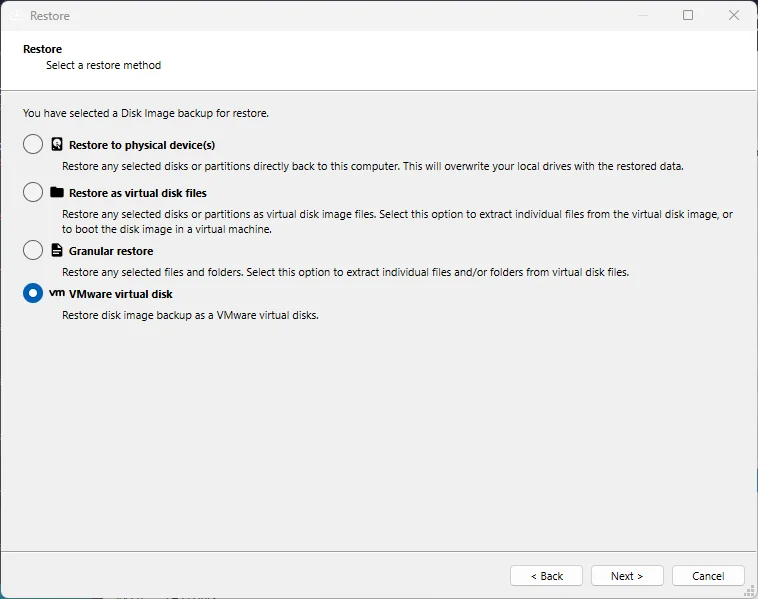
We've also added a feature to restore Disk Image backup jobs as VMware vSphere-compatible virtual disks.

Both Disk Image and our new VMware Protected Item type generate virtual *.vmdk files inside Comet's deduplicated Storage Vault. However, the subformat of the files does differ slightly. Until now, users who are using Comet to perform a physical-to-virtual (P2V) migration from a physical disk to a VMware virtual machine have been required to perform an extra file format conversion after the restore, requiring extra time and temporary disk space. With the new option in Comet to restore the disk in VMware vSphere-compatible file format, the conversion takes place dynamically as part of the restore job, simplifying the process and helping meet your recovery time objective (RTO).

Audit logging

Earlier this year, we added Audit Logging support to the self-hosted Comet Server product, to help our partners meet their compliance obligations. Since then, we've expanded the list of audit properties, and added a helpful option to configure this feature directly from the Comet Server web interface from the Settings page on the "License & Access" tab.

The new controls should make it much more accessible to configure Audit Logging support for your Comet Server.

September 2023: What's New?

· 4 min read

"What's New?" is a series of blog posts covering recent changes to Comet in more detail. This article covers the latest changes in Comet Voyager over September 2023.

There were five Comet software releases during September - four releases in the 23.9.x Voyager release series, plus one for our quarterly 23.8.x Adrastea release series.

Remote Registration

We've been hard at work developing a new way to register devices you would like to protect, right from the Comet Server admin web interface.

With the new remote registration feature you can remotely register a device and assign it to a user profile, right from the Comet Server admin web interface when the device has been silently installed using the /LOBBY flag.

  • Command Prompt: install.exe /S /LOBBY
  • Powershell: Start-Process .\install.exe -ArgumentList "/S", "/LOBBY"

Adding a device to a user is now as easy as clicking the register button. If you'd like to know more please checkout our silent install documentation.

Connected Devices Page Refresh

We've renamed the Connected Devices page to the Devices page and made a number of improvements to this area.

You can now see all devices that have been connected to your Comet Server, not just online devices. This extra information will allow for easier troubleshooting of what state each of the devices connected to your server are in.

We have also added bulk actions to the Devices page. These bulk actions allow you to manage the devices connected to your server much faster than before.

As a final touch we have updated how clicking a device status on the "My Devices" widget works. If you click on "Online," this will take you to the Devices page and apply a filter so that only online devices are shown.

Gradient MSP aggregate usage by Account Name

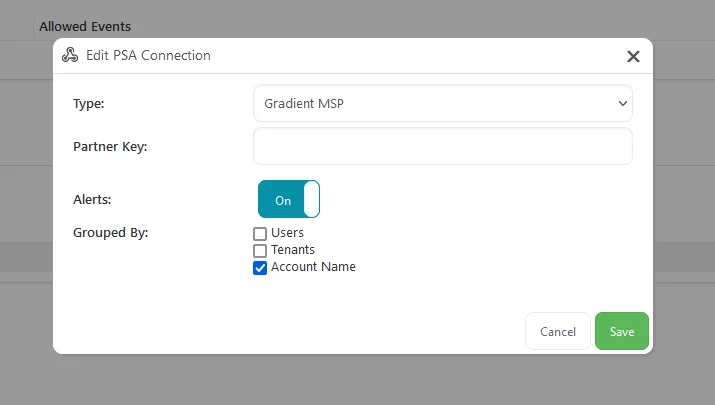
We are excited to share that we've enhanced our Gradient MSP integration to aggregate usage using the Account Name field on a user's profile.

To use this new enhancement you just need to enable grouping by Account Name when editing a new or existing Gradient MSP PSA Connection.

Diagnosing Unexpected Running Jobs

We've added extra detail to every job log to identify if the backup job was triggered by a schedule, a missed backup job, or a device start-up.

This will help diagnose what caused the device to run the backup out of schedule. To see more about it check out our troubleshooting guide.

Stuck Running Jobs

In rare circumstances it is possible for a backup or restore job to be stuck in a running state. For example, this can occur if a device becomes damaged when running a backup job and never starts up again to report to the Comet Server. These jobs stay visible on the Comet Server and impact how easy it is to monitor other jobs that are actively running.

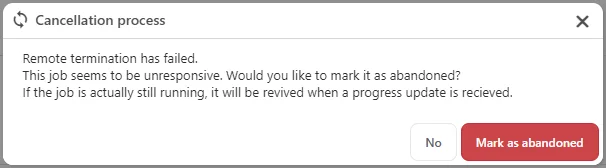
As a first step to provide you with the tools to manage stuck running jobs, we have added the ability to manually mark a stuck running job as abandoned from the admin web interface.

An abandoned job is a job that Comet has automatically determined is no longer running after communication with the client was lost, or one that has been manually marked as abandoned by an admin. We have updated our documentation to add clarity to what each of the job statuses mean.

Marking a job as abandoned has been added to the "cancel a job" workflow. To remove a stuck running job, simply attempt to cancel the job and the Comet Server will help you with the rest.

A job marked as abandoned will revive itself and show as running if the Comet Server ever receives an update about that job again.

August 2023: What's New?

· 9 min read

"What's New?" is a series of blog posts covering recent changes to Comet in more detail. This article covers the latest changes in Comet Voyager over August 2023.

There were six Comet software releases during August - five releases in the 23.6.x Voyager release series, plus one release for the launch of our new quarterly 23.8.x Adrastea release series.

New design for the Comet Backup desktop app

We're very pleased to announce a visual refresh for the Comet Backup desktop app:

This work followed on from the new design for the Comet Server web interface that was released earlier this year for the previous 23.5 quarterly series. This is the first major layout change to the desktop app in Comet's history; the current desktop app has had the same layout for the past six years.

Our goal for the new interface design was to make the product simpler for new users, while still keeping it familiar for existing users. The tabs, icons, buttons, fonts and colors have all been refreshed with a modern rounded style, but you are still greeted with your familiar Protected Items and charts on the home screen.

The most fundamental change was made to navigation within the app: the previous left-side navigation bar has been removed, meaning your Protected Items are always clearly visible, and we have refreshed the breadcrumb bar appearance to help orient you to this landmark interface element. The removed left-side navigation bar has been replaced with a top navigation bar which puts more emphasis on your branded company logo, and offers clearer, more distinctive focus on the calls-to-action for the key backup and restore functionality.

In the top-right corner, you will see a a dropdown overflow menu, using modern and intuitive UX iconography. Inside this menu, you can get quick access to detailed job history; creating recovery media for restoring Disk Image backups; and a new Settings dialog. The new Settings dialog contains Storage Vault management, account and login settings, email reporting settings, your devices, and the ability to import settings from other supported backup products.

If you had configured a custom Help webpage for embedded use, it will now appear as a button on the main screen.

VMware beta program

We've been hard at work developing the next Protected Item type for Comet, to add VMware support.

This has been a highly upvoted feature on our Feature Request page for some time. We've spent extra time and effort on making this Protected Item type as polished and performant as possible.

The details are subject to change before release, but we expect to be able to support major versions of VMware ESXi (6 / 7 / 8) and vCenter, using either free or paid licenses. Your backup jobs can be accelerated using changed block tracking (CBT) to produce synthetic full disk images that are deduplicated inside your Storage Vault. The new Protected Item type will work seamlessly with Comet's scheduling, deduplication, compression, encryption, job reporting, tenants, and granular restore of single files from supported virtual disk filesystems.

We're in the final stages of the beta program and are currently accepting new partners to help us ensure that this new Protected Item type is a good fit for your production VMware infrastructure. If you are interested in getting early access to this feature, please follow this link to register your interest - we would greatly appreciate any feedback you might be able to give us before the official launch later this year.

Price change notice for Backblaze B2

Comet has supported Backblaze B2 as a storage platform for over six years, since our 17.6.4 release back in July 2017. Over the years Backblaze B2 has proven to be a reliable, trustworthy, performant, and cost-effective solution. Together with Wasabi, these are the two most popular cloud storage providers amongst Comet users.

This month, Backblaze B2 have announced a price change. The base storage cost is increasing from $5 USD / TB to $6 USD / TB, but egress bandwidth costs are being reduced. For full details, please see their official announcement.

WebDAV

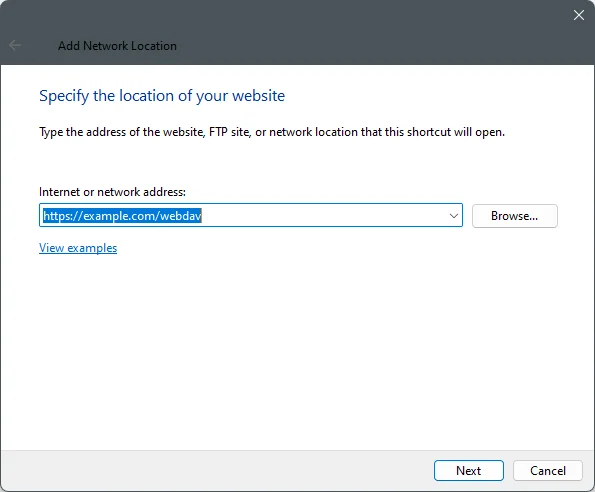
WebDAV is a storage protocol like FTP, SFTP, or the S3-compatible protocol, that can be used to store files in a remote location. It's based on HTTP technology and supports password based authentication, as well as transport layer security over HTTPS. The protocol has been around since 1996 and was standardized by the IETF in RFC 4918.

Accessing a remote WebDAV server is a built-in feature of Windows Explorer, as well as macOS Finder and the KDE and GNOME file managers.

Because the capability for accessing remote storage is built into the operating system, WebDAV is simple to use with a very low barrier to entry, helping it maintain a broad user base amongst enterprises, universities, and commercial service providers including Hetzner Storage Box, DreamHost, Yandex Disk, pCloud, and many others.

You can easily host your own WebDAV storage server as the protocol is built into NextCloud, OwnCloud, and the Apache and Microsoft IIS web servers. In particular, users of Synology NAS devices can install the WebDAV Server app from the Synology Package Center for a more reliable alternative than configuring SMB credentials.

WebDAV is available as a storage type for Storage Vaults and for Comet Server Storage Role in 23.6.9 and later.

Quick feedback

The next time you visit the account.cometbackup.com dashboard, you might notice a new "Feedback" tab on the right-hand side of the screen:

Clicking the "Feedback" text will open a short survey asking for any short thoughts you have about your impressions of Comet and how easy our product is to use. Our Customer Success team would really appreciate any answer you give. After submitting feedback, the tab will disappear, but you can submit more feedback at any time by clicking the "Give us Feedback" link in the page footer area.

If you have long feedback or any questions, we would appreciate this via the existing communication channels, such as a support ticket or an email.

23.8.0 Adrastea

Earlier this week, we put the finishing touches on our latest quarterly release, Comet 23.8.0 Adrastea. This is the the latest entry in our quarterly rollup series, that branches off from our main rolling Voyager development into a fixed target for you to qualify and build your service offering upon.

As with all our recent quarterly release series, Adrastea is named after a moon of Jupiter, which in turn takes its name from an ancient Greek mythological figure. It is the second-closest moon to Jupiter and the smallest of the four inner moons, orbiting at the edge of Jupiter's main ring. It is thought to be the main contributor of material to the rings of Jupiter.

For users coming from the previous 23.5 Thebe quarterly release series, Adrastea adds 7 features and 24 enhancements, including the new Comet Backup desktop app design and WebDAV support mentioned above; single sign-on support with OpenID Connect (OIDC); Protected Items that can stay linked with the user's Policy; additional admin permission options; and many performance improvements.

The 23.8.0 series does remove support for some old versions of macOS. If you have users with old Mac machines that are not able to upgrade the OS, the previous 23.5.x Comet Backup client will remain capable and working when connected to a 23.8.x Comet Server.

The full set of changes can be found in the release notes.

Webinar announcement

If you'd prefer to watch rather than read, we're hosting a webinar next week to discuss this new quarterly release and all the new changes. Please register for a notification before we go live on September 5th (5pm EDT / 2pm PDT) to catch up on all the latest Comet news with me - and as usual, there will be time for a live question-and-answer session at the end of the presentation.

As well as that, we have many more videos available on our YouTube channel, including guides on getting started with Comet, individual features, demonstrations with our technology partners, and webinars for previous quarterly software releases.

July 2023: What's New?

· 8 min read

"What's New?" is a series of blog posts covering recent changes to Comet in more detail. This article covers the latest changes in Comet Voyager over July 2023.

There were five Comet software releases during July - one in our quarterly 23.5.x Thebe release series, plus four releases in the 23.6.x Voyager release series.

Single sign-on with Microsoft, Google, and OIDC

Comet Server is adding support for administrators to single sign-on (SSO) to the Comet Server web interface, using a supported OpenID Connect (OIDC) identity provider:

OIDC is a framework for authentication and authorization, based on the OAuth 2.0 standard. It's widely used by many providers for "Log in with..." buttons. This new feature extends our existing single sign-on support using the LDAP protocol.

The additional identity providers (IdPs) now supported are:

  • Microsoft Entra ID (formerly Azure AD)
  • Google (Google Cloud, Google Workspace, or personal)
  • Any other OIDC-compatible provider that uses a discovery document (usually at the .well-known/openid-configuration URL path).

You can configure a new OIDC provider from the Comet Server web interface > Settings screen > "Admin Accounts" tab > "External Authentication Sources" button:

To use this feature, you should first visit your IdP's settings page, register a new application credential within the IdP, and copy the credentials to this settings page. You will then need to copy Comet's generated "Redirect URI" field back into your IdP's settings page.

When the administrator user uses the new "Log in with..." button and performs a successful login operation via the IdP, a new Comet Server administrator account will be dynamically created for them on-demand. As with LDAP, you can specify which Comet Server permissions are granted to the newly generated account. This new account is marked as "Externally managed" within the "Admin Accounts" table, ensuring that valid IdP login is required to access this administrator account.

If your IdP enforces two-factor authentication (2FA), you can configure Comet Server to skip enforcing its own internal 2FA on the account, so that the user is not bothered twice.

You can request custom scopes, and enforce claim values against either custom scopes or standard OIDC scopes. This allows you to enforce that the only members of certain Microsoft, Google, or OIDC groups within your IdP are allowed to log in to the Comet Server.

This feature is available both for the top-level Comet Server administrator as well as individually for each tenant.

Price change notice for Comet Storage powered by Wasabi

Our Comet Storage service gives you the option to purchase Wasabi Cloud Storage directly from Comet, offering all-in-one billing and providing a more integrated experience. This month, we've passed along the latest price changes from Wasabi, to their new price of $6.99 / TB.

For more information, please see Wasabi's official announcement.

Improved job start performance

When backing up a Files and Folders-type Protected Item, one of the first steps is for Comet to enumerate all the selected files, in order to calculate their total size. The total size is used to enforce the "All Protected Items Quota" feature, as well as to properly determine the progress bar's expected upper bound. If you are running a headless device with no GUI to render the progress bar, and you are not using the "All Protected Items Quota" feature, then there's no remaining purpose for this scan phase, and so Comet will skip it to save time.

We heard mixed feedback about this - a discussion in our feature voting system uncovered some use-cases where the progress bar would still be desirable even on headless devices with no GUI. But also, there was competing feedback that spending time on file size measurement is still slow and undesirable even in some cases where the GUI was present.

In the latest version of Comet, we've come up with a new and better approach to this issue. If the "All Protected Items Quota" feature is used, then we require an accurate measurement up-front regardless. But if this feature is not used, then we can rapidly create an approximate progress bar size based on the previous backup job's size plus some small estimated buffer amount. This should provide a great speed improvement for GUI users, a reasonable progress bar for headless users, and at the same time, provide an accurate measurement for quota users. The reported size measurement will always be completely accurate after the backup job finishes.

Improved low-memory modes

For users using Comet on devices with low RAM, our software has long since offered the "Prefer temporary files instead of RAM (slower)" option for backup jobs, to toggle whether Comet stores the deduplication index either in-memory or on-disk in a temporary database file. Enabling this option can significantly reduce Comet's memory usage, allowing the backup job to complete on low-memory devices, at the expense of a longer backup job duration.

The latest version of Comet extends this option to also use a small in-memory bloom filter. This allows Comet to perform some of the deduplication operations in-memory with minimal overhead. This new combination technique can significantly improve the performance of this option for low-memory devices.

The deduplication index is needed for almost all operations involving the Storage Vault, not just backup operations. This month, we've also added an option to use temporary files instead of RAM during a restore, extending the possible use cases for Comet on low-memory devices.

Performance improvements for new servers

The performance improvements this month are not limited to the Comet app itself. We've also significantly improved the account.cometbackup.com system: downloading the large Self-Hosted Comet Server installer is now implemented via an Amazon CloudFront cache, improving download speeds between 2-6x in our testing.

We have also been able to significantly improve the speed of creating new Comet-Hosted Comet Server instances. The creation time has been reduced from 60-90 seconds down to 10-15 seconds, owing primarily to some changes in the default generated DNS names.

Configuration change notice for PKCS11 codesigning

Comet supports Authenticode codesigning for Windows using either an on-disk file (PKCS #12), or a hardware security module such as a USB device (PKCS #11), or a cloud HSM on Azure Key Vault. With the file-based approach no longer being supported for new Authenticode certificates, we are seeing increased use of the alternative PKCS #11 and Azure Key Vault options, as partner Authenticode certificates come up for renewal.

If you are using a physical USB device for Authenticode codesigning, we have updated the available settings options to improve compatibility with a wider range of devices. The new settings screen should be clearer and easier to use, but you may be required to update your configured settings, as depicted:

If your Comet Server is running in a cloud VM, it's not feasible to plug in a USB hardware device for codesigning. We would recommend Azure Key Vault as an excellent cloud-based solution to this issue, but we've also recently tested the compatibility of the third-party Virtualhere software for remotely forwarding a physical USB device to another PC, and we can confirm this solution works for PKCS#11 codesigning when running Comet Server on a cloud VM.

When using the Comet Server web interface, the quick search bar (using the Alt + Q keyboard shortcut) could previously search through usernames, Account Name field values, Protected Item and Storage Vault names, settings pages, and more. In the latest version of Comet, we have extended the search capabilities to also find users by their email address.

You can also now enter the ID of a Protected Item, Storage Vault, or even a backup job, and the quick search bar will try to match it with the corresponding user or job. This is particularly helpful for troubleshooting some situations.

That's all for this month - the blog will return next month with more news about all the latest changes to Comet.