Linux recovery environment ISO can now be built without Docker on Linux
Creating the Linux recovery environment ISO using Comet Backup on a Linux endpoint can now be done without requiring Docker to be installed. This simplifies the install requirements to build the Linux recovery environment and also reduces how long it takes to build the recovery environment.
VMware Protected Items configured using Changed Block Tracking can now fallback to a full backup
VMware Protected Items that have been configured to use the Latest VM state (Changed Block Tracking) mode will now fallback to performing a full VM backup when Comet detects that more than 50% of the disk has changed. This speeds up the backup peformance when large parts of the VM has been modified.
As part of our efforts to improve the experience of using Comet, in Comet 25.3.0 we have added functionality to automatically change Storage Vault access keys for some of our supported storage providers, allowing admins to manually unlock compatible Storage Vaults without the risk of data loss.
Vaults can also be automatically unlocked when specified criteria, configured in user policy settings, have been met.
The following Storage Vault types are currently supported:
As part of our efforts to improve the usability of Comet, all Comet Server Roles have been renamed.
Auth Role has been renamed to Management Console.
Storage Role has been renamed to Storage Gateway.
Constellation Role has been renamed to Cluster Manager.
Software Build Role has been renamed to Backup Agent Downloads (and moved to a setting of the Management Console).
These changes better reflect the capabilities of each role making it easier for new and existing customers to understand what each role does.
As part of this change, the Comet Server Service Manager (CSSM) has been renamed to the Comet Core Service Manager (CCSM).
The Comet Server web interface has also been update to reflect this changes, grouping the related side menu pages and settings under each of the new names.
Storage Templates are Comet's recommended way to configure and deploy Storage Vaults for your backup infrastructure. Findng the Storage Templates settings on a Self-Hosted Management Console has been made significantly easier.
In older versions of Comet, the Storage Template settings were found as part of the Management Console (previously Auth Role) settings. This has now been moved to its own settings section which is a lot easier to find.
Restore Hyper-V and VMware Protected Items directly into new Hyper-V virtual machines
Comet 24.12.5 introduces the ability to restore virtual machine Protected Items directly into new Hyper-V virtual machines.
This brings:
Restore Windows & Linux virtual machines: Both Windows & Linux virtual machines can be restored.
Faster VM Restores to Hyper-V: VMs are converted on the fly at restore time into a format Hyper-V can boot.
VM Migrations: VMware (vSphere or VCenter) virtual machines can be restored to Hyper-V using Comet.
Direct restores into Hyper-V is available from the Comet Server web interface and from the Comet Backup desktop app. The following screenshots are from the Comet Server web interface.
NOTE: For direct Hyper-V restores, the Comet Backup desktop app must be running on the same endpoint as Hyper-V is installed on.
Restore Hyper-V and VMware Protected Items directly into new VMware (vSphere or VCenter) virtual machines
Comet 24.12.5 introduces the ability to restore virtual machine Protected Items directly into new VMware (vSphere or VCenter) virtual machines.
This brings:
Restore Windows & Linux virtual machines: Both Windows & Linux virtual machines can be restored.
Faster VM Restores to VMware: VMs are converted on the fly at restore time into a format VMware can boot.
VM Migrations: Hyper-V virtual machines can be restored to VMware using Comet.
Direct restores into VMware (vSphere or VCenter) is available from the Comet Server web interface and from the Comet Backup desktop app. The following screenshots are from the Comet Server web interface.
Restore Disk Image Protected Items Directly into Hyper-V or VMware (vSphere or VCenter) virtual machines
Comet 24.12.5 introduces the ability to restore Disk Image Protected Items directly into a new Hyper-V or VMware (vSphere or VCenter) virtual machines.
This brings:
Restore Windows & Linux: Both Windows & Linux Disk Image Protected Items can be restored.
Physical to Virtual (P2V) Migrations: Physical devices can be migrated to virtual machines.
Faster Disk Image Restores: Disk Image Protected Items can be restored to virtual environments, without requiring physical hardware.
Disk Image restores into Hyper-V or VMware (vSphere or VCenter) is available from the Comet Server web interface and from the Comet Backup desktop app. The following screenshot is from the Comet Server web interface.
Improved User Experience when deleting Default Protected Items created by Policy
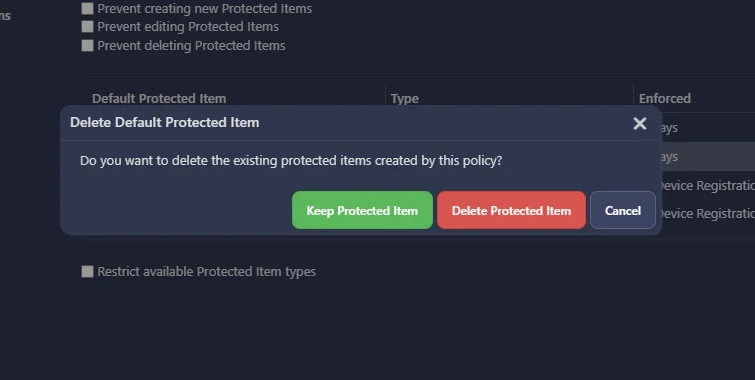
Previously, deleting a default Protected Item from a Policy would delete the Protected Item from all Users and Devices the Policy is applied to. This meant it was impossible to remove the Default Protected Item from the Policy, but keep the Protected Item.
In Comet 24.12.5, new Comet Server web interface dialog prompts have been added to give admins greater control over what Default Protected Items should be kept and should be removed. This means admins can make changes to Policies at any time without impacting the Default Protected Items configured.
URLs for Malware and Failed Access Files Are Now Outputted During a Microsoft 365 Protected Item Backup
When Comet skips a file during a Microsoft 365 Protected Item Backup, this can be due to the file being reported as Malware by Microsoft 365 or because Comet does not have the correct permissions to access the file. Now, Comet will list the exact URL of the file it failed to backup and list the reason why. This makes it much easier to debug and diagnose why a file was not backed up correctly.
Automatically Rescan LVM2 Partitions after Disk Image Restore in Linux Recovery Environment
After restoring LVM2 partitions, Comet will now automatically show the new devices in the recovery environment. This means you are able to confirm the Disk Image restore worked as expected without needing to leave the recovery environment.
IP Whitelist Settings Available for Admin Accounts in the Comet Server web interface
Self-Hosted Comet Server Only
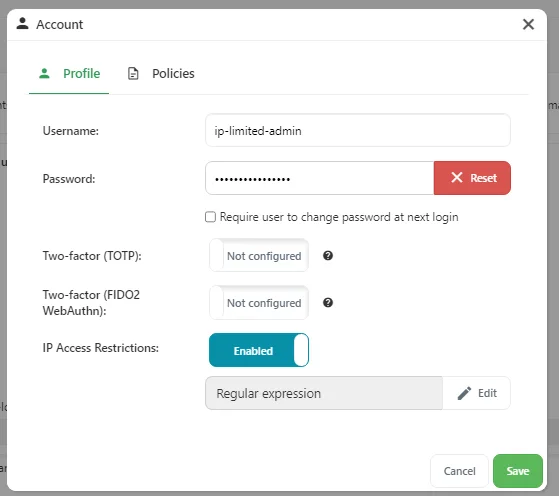
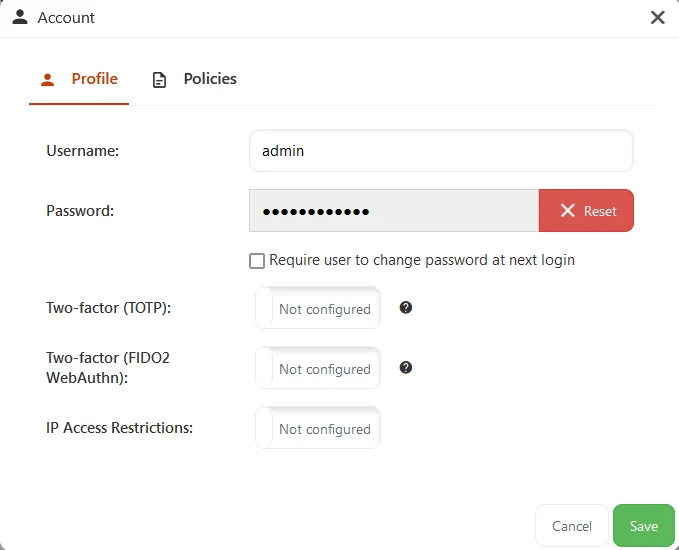
To improve secure access to a Comet Server, in Comet 24.12.3 it is now possible to configure allowed IP addresses for admin accounts when logging in. This means Comet will only allow admin logins from a predefined list of IP addresses. These addresses can be configured in the Comet Server web interface.
NOTICE: In this release the Windows System Backup Protected Item has been removed. All Windows System Backup Protected Items will be converted to Disk Image Protected Items upon upgrading.
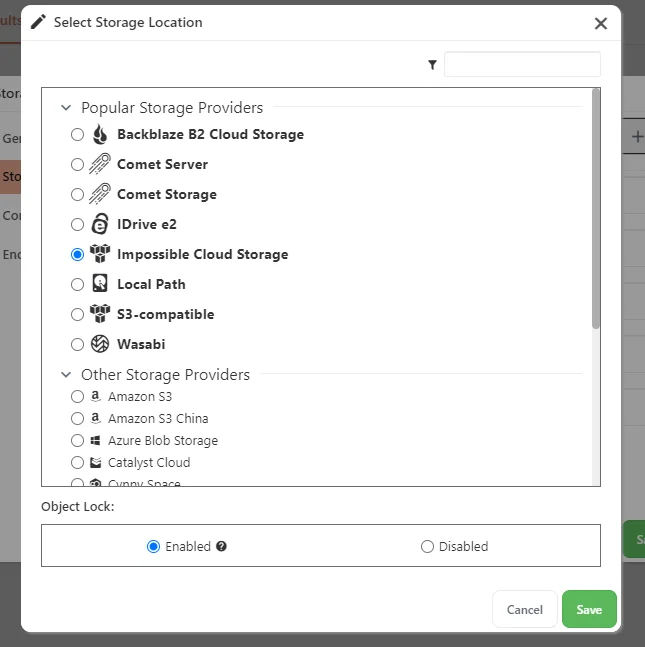
In Comet 24.12.2, Impossible Cloud has been added as a new location when configuring a Storage Vault for a endpoint. This makes it easier to roll out Impossible Cloud as a cloud storage destination.
In Comet 24.12.2, Granular Restores from Disk Image, Hyper-V or VMware Protected Items will complete up to three times faster. This means faster restore times when you need to restore critical files as fast as possible.
Fixed an issue with Windows based paths in the predefined filters for the File and Folder exclusion being incorrect
Fixed an issue with extra warnings about skipping unused filesystem sectors for small partitions and alignment extents in Disk Image for Linux
Fixed an issue in the Comet Server web interface causing Microsoft 365 Protected Items to request the account listing twice
Fixed an issue with the Comet Backup desktop app crashing during backup if some Microsoft 365 account services were de-selected for backup
Fixed an issue with the Comet Server web interface crashing when selecting an option from the search bar that was under the "Pages" section
Fixed an issue where the Constellation Target fields for a Local Server were editable in the Comet Server web interface
Fixed an issue with --ignore-table and --no-tablespaces compatibility when backing up a MySQL database without mysqldump available on the system
Fixed an issue in the Comet Backup desktop app causing Microsoft 365 Protected Items to request the account listing twice
Fixed an issue with the Self-Hosted to Comet-Hosted migration API if a custom Storage Role prefix was used
Fixed an issue causing significantly more data to be downloaded than necessary when performing a granular restore of many small files from a Disk Image, Hyper-V, or VMware backup
In Comet 24.12.0, it is now possible to group users in the Comet Server web interface. This will allow users belonging to a department, company, cost center, etc. to be grouped logically inside Comet. This makes it easier to find customers belonging to the same group as well as easily roll out policies for everyone assigned to a group.
In Comet 24.12.0, a new User setting is available to choose if devices that share the same user account login should back up Protected Items to a shared Storage Vault or isolated Storage Vaults. There are pros and cons of each option:
Pros of shared Storage Vaults: Data from multiple devices stored in a shared Storage Vault can take advantage of Comet's deduplication, reducing overall storage requirements.
Cons of shared Storage Vaults: Devices are able to see and restore all data from the other devices, and it is possible for backups to be delayed or missed on a device due to the Storage Vault being locked for retention jobs.
Pros of isolated Storage Vaults: Devices cannot see or restore data from other devices, and there is no risk of delayed or missed backup jobs due to the Storage Vault being locked.
Cons of isolated Storage Vaults: Backup data will not be deduplicated between devices increasing overall storage requirements.
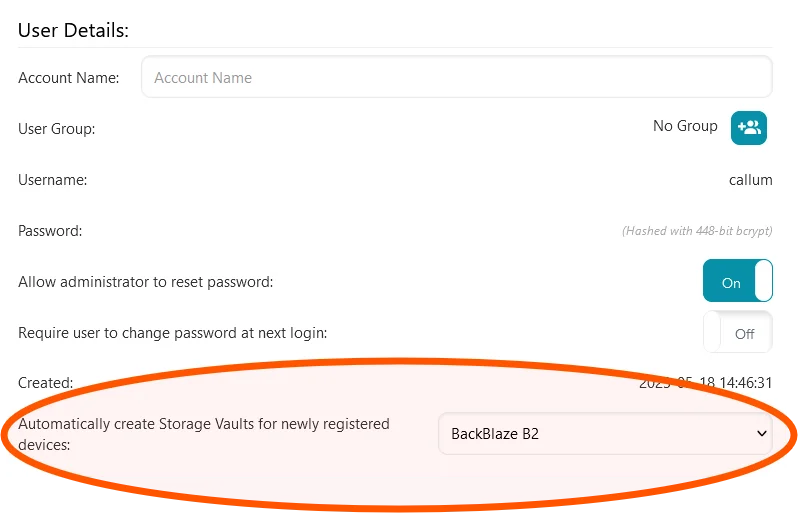
To configure isolated Storage Vaults, when configuring a new user account select the "Provision storage vaults automatically ..." option under Storage Vault Provisioning. For existing users, head to the users account page and set the "Automatically create Storage Vaults for newly registered devices" option to a Storage Template.
To configure shared Storage Vaults, when configuring a new user account select the "Provision storage vaults once ..." option under Storage Vault Provisioning. For existing users, head to the users account page and set the "Automatically create Storage Vaults for newly registered devices" option to (none).
In Comet 24.12.0, a new Admin Accounts setting is available to enforce that the password for the admin account is changed the next time they log in. This feature can be used to regularly enforce that passwords used to log in to a Comet Server web interface are changed.
Rate Limiting for Failed Login Attempts to a Comet Server
Self-Hosted Comet Server Only
In Comet 24.12.0, a new License & Access setting is available to block users and IP addresses after repeated unauthorised logins. This feature should be used in combination with other security features such as Multi-Factor Authentication to protect against malicious attempts to gain access to your Comet Server.