26.10.0 Epimetheus released
Epimetheus is the latest entry in our quarterly rollup series. It branches off from our main rolling Voyager development into a fixed target for our partners to qualify and build upon.
This quarterly release is named after Epimetheus, one of Saturn’s smaller moons and the orbital companion of Janus, our previous release’s namesake.
In Greek mythology, Epimetheus means “hindsight,” while his brother Prometheus represents “foresight.” And much like its mythological namesake, Epimetheus has an interesting history of looking back. When astronomers first observed the moons in the 1960s, they didn’t immediately realize they were seeing two separate objects. It took years of observations to unravel the mystery.
Sometimes, even in space, hindsight is 20/20!
Comet 26.10.0 Epimetheus is mostly about restores and integrations. Highlights include in-browser restores from the Comet Management Console, restoring directly to remote and cloud locations, mounting snapshots as a read-only folder on Linux, new NinjaOne RMM and ConnectWise Manage PSA integrations, a rule-based Microsoft 365 account selector with exclude rules, scheduled backup speed limits, Admin API tokens, and NFSv4 Storage Vaults. This release also adds a Disk Management tool to the WinPE Recovery Environment, more codesigning options, and large memory and speed improvements when loading Storage Vault indexes.
As always for a new quarterly release, there are two changelogs for 26.10.0 depending on whether you are coming from the previous quarterly release or the previous Voyager release:
Changes compared to 26.7.3 (Janus)
Notice
Microsoft 365 OneDrive service selection is now honoured by full backups
Previously, a Protected Item covering a user's personal OneDrive captured that OneDrive during a full backup even when the OneDrive service was not selected, and then dropped it from every later incremental backup. Full and incremental backups now both follow the OneDrive service selection. If unselected personal OneDrive data was being captured before, it will no longer be included in new backups, and a warning is logged whenever content is skipped for this reason.
New Features
In-browser restore in the Comet Management Console
Users and administrators can now restore a Protected Item, or a whole snapshot, from a Storage Vault directly in the web browser as a downloadable archive, without installing the Comet Backup desktop app. A new Restore... action is available on the Protected Items table of the user page.


A new Allow administrator to restore data option lets an administrator perform an in-browser restore on a user's behalf. The user can turn it on from the Comet Backup desktop app, and it can be turned off from either the Comet Management Console or the desktop app.
Restore Comet-Hosted Microsoft 365 data to a download archive
Selected items, or a whole snapshot, from a Comet-Hosted Microsoft 365 Protected Item can now be downloaded as a TAR or ZIP archive.
Restore directly to remote and cloud locations
Restores can now write directly to remote and cloud storage locations, instead of only to a local disk on the device.
Mount a snapshot as a read-only folder on Linux
A File and Folder snapshot can now be mounted as a read-only folder from the Restore dialog of the Comet Backup desktop app on Linux, including when running inside WSL2. Files are only downloaded from the Storage Vault when they are opened, and active mounts can be opened or unmounted from the new Mounted snapshots dialog.
NinjaOne RMM integration
NinjaOne is a unified IT management platform combining RMM, endpoint management, and ticketing. Comet's new NinjaOne integration surfaces backup status directly inside NinjaOne, so you can monitor your customers' backups alongside the rest of their endpoint data instead of switching between tools.
Once configured, Comet writes the outcome of each backup to custom fields on the matching NinjaOne device (Last Backup Status, Last Backup Time, Last Backup Destination, Last Backup Total Size, and the Comet Job ID), refreshed automatically after every job.

You can also enable automatic ticketing. When a backup fails, Comet opens a NinjaOne ticket against the affected device, with a link back to the Comet job log and a summary of the run. Repeated failures on the same device and Protected Item add a comment to the existing ticket and escalate its severity rather than creating duplicates, and when the next backup succeeds Comet resolves the ticket automatically.

The integration is configured under Settings → Integrations in the Comet Management Console and requires the NinjaOne Agent on each device. For full setup instructions, see the NinjaOne integration guide.
ConnectWise Manage PSA integration
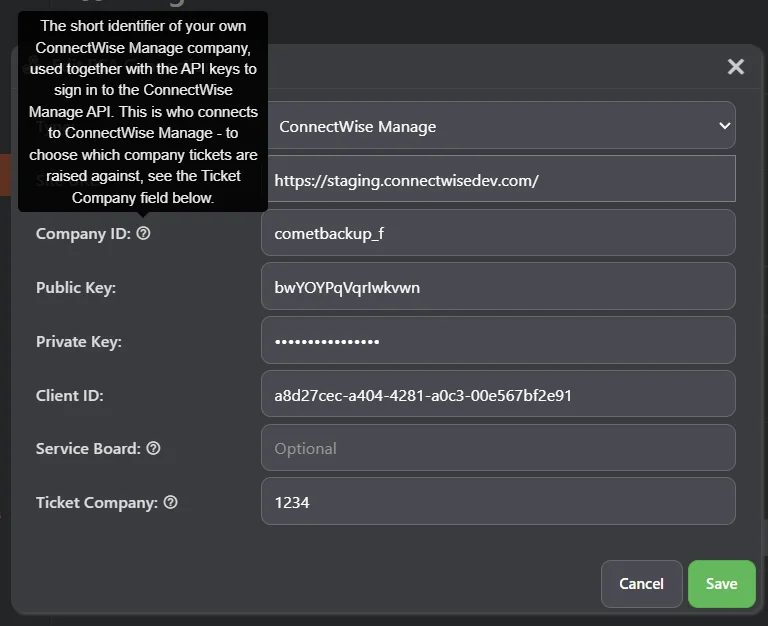
ConnectWise Manage joins Comet's existing PSA integrations. Comet Server automatically raises a ConnectWise Manage ticket when a backup job fails or a scheduled backup is missed, matched to the affected client, device, and Protected Item, with a severity based on the failure type. Repeated failures on the same device and Protected Item add a note to the existing ticket and escalate its severity instead of opening duplicates. The integration is configured under the PSA settings in the Comet Management Console.

Rule-based Microsoft 365 account selection with exclude rules
Account selection for Microsoft 365 Protected Items has been redesigned around an ordered list of include and exclude rules, in both the Comet Management Console and the Comet Backup desktop app. You can now exclude specific users, groups, teams, or sites, for example to back up an entire organization except a few accounts, while an "All accounts" rule automatically protects users added to the organization later. Rules require Comet Backup 26.8.1 or later on the device.


Automatically start a Bulk Update Campaign when the Comet Management Console restarts
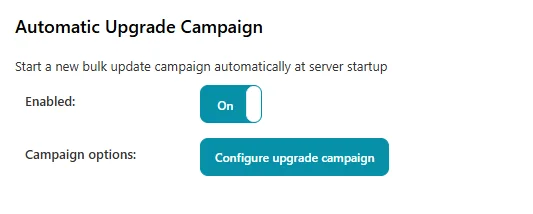
A new Automatic Upgrade Campaign option starts a fresh Bulk Update Campaign each time the Comet Management Console restarts, rolling the update out across your devices with no manual step. A new campaign is only started if it has been more than 24 hours since the last one, so quick or repeated restarts do not cause redundant campaigns.
A top-level administrator can turn this on under the Backup Agent Downloads settings, and use Configure upgrade campaign to choose how the campaign behaves: whether to upgrade older versions and/or downgrade newer ones, whether to wait for running backup jobs or interrupt them, and whether to target all devices or a filtered subset.

Scheduled backup speed limits
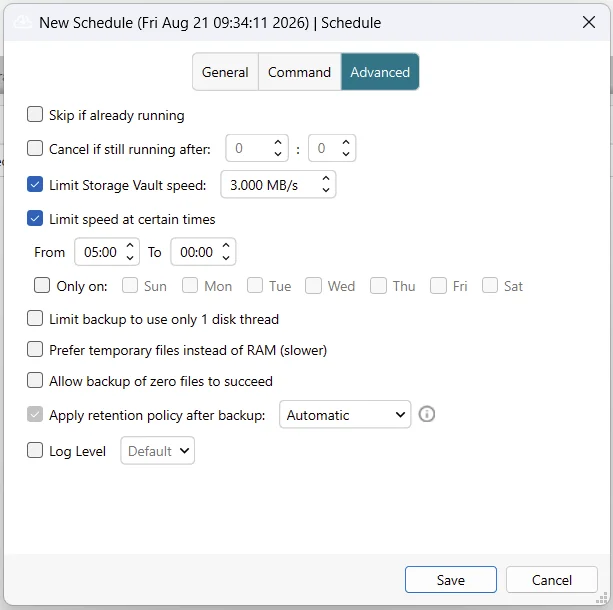
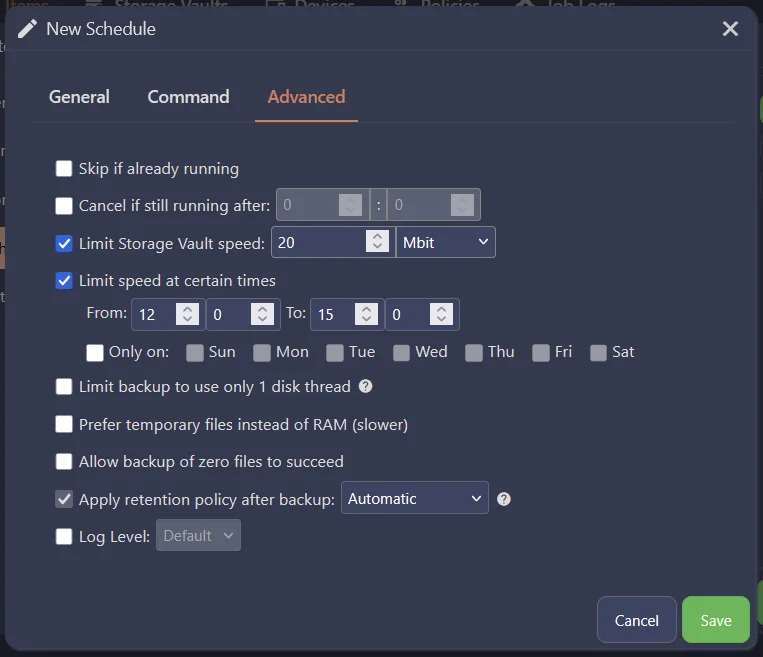
A backup job's speed limit can now follow a schedule, so a job can be held to a lower speed during business hours and run at full speed overnight. This has been a long-standing request from customers whose devices share a slow internet connection, where a large first backup can run for days. When a scheduled window starts or ends, the new limit applies immediately, including to transfers already in progress.
Admin API tokens and read-only admin accounts
Administrators can now create Admin API tokens for programmatic API access, without sharing their password or 2FA. A new admin policy option, Restrict this account to read-only access, prevents an admin account from using any API method that performs a write action.
Disk Management in the WinPE Recovery Environment
The WinPE Recovery Environment now has its own Disk Management dialog, so disks can be prepared for a Disk Image restore without calling out to Windows' diskmgmt.msc. It can list disks and their partitions, initialize a raw disk as GPT or MBR, clean a disk, create a new simple volume, format a partition, assign or change a drive letter, extend a volume into adjacent unallocated space, shrink an NTFS volume, and delete a partition.


NFSv4 Storage Vaults
NFSv4 is now a supported option for Storage Vaults and Comet Storage Gateway.
Automatic access key rotation for Backblaze B2 and Comet Storage Gateway templates
Storage Vaults provisioned from a Backblaze B2 Storage Template or a Comet Storage Gateway Template now support automatically rotating their access keys and clearing Storage Vault locks. You can also issue a new key for an existing bucket from the Storage Buckets page of the Comet Management Console.
More codesigning options
- Windows Authenticode codesigning of client software can now use a key stored in AWS Key Management Service (KMS) or Google Cloud Key Management Service (Cloud KMS)
- Windows Authenticode codesigning can now use Azure Artifact Signing (formerly Azure Trusted Signing)
- A new Linux (RPM) tab in the Codesigning settings dialog accepts a GPG signing key to sign the Linux RPM backup-tool installer
- A top-level administrator can now keep an allowlist of the PKCS#11 driver module file paths permitted for Authenticode codesigning. Any PKCS#11 module paths already in use are added to the allowlist automatically on upgrade
Custom code in the Branding settings
A top-level administrator can now add custom JavaScript and CSS to the web interface from a new Custom code section on the Branding page. Code can be supplied inline or loaded from an external URL, placed in the document head or at the end of the body, and applies to the login page and the web interface of all tenants. The page Content-Security-Policy is extended automatically to permit only the code that was configured.

Extra Fields on the user profile page
User profiles have supported free-form metadata since Comet 26.2.1, but it could only be edited through the API. The user profile page in the Comet Management Console now has an Extra Fields section for editing it directly, useful for notes, contact details, or IDs linking the user to an external system. Each entry can be marked as admin-only or visible to the end user.
Test Connection for Proxmox restores in the Comet Management Console
The Proxmox destination page of the Restore dialog in the Comet Management Console now has a Test Connection button, matching the Comet Backup desktop app. The test is relayed through the connected device, so it checks the same SSH connection the restore job will use. SSH host key verification options have also been added to this page; previously, Proxmox restores started from the web interface always skipped host key verification.
Create Linux recovery media on Windows using WSL2
The Create Recovery Media wizard of the Comet Backup desktop app can now build the Linux ISO recovery media on Windows using WSL2, so Docker or Podman is no longer required.
Skip existing items when restoring to Office 365
When restoring to the Office 365 cloud, mail messages and OneDrive and SharePoint files that are already present at the destination can now be skipped. The option is enabled by default in the restore dialog.
MySQL user accounts, grants, and recovery metadata in snapshots
MySQL Protected Items can now store an integration's own recovery metadata file in each snapshot using the METADATA_FILE EngineProps key, and can capture the server's user accounts and privilege grants as a SQL script using the INCLUDE_USERS_GRANTS EngineProps key. Both are skipped by database replay restores and can be retrieved with a file restore.
Enhancements
Faster Storage Vault index loading
Loading Storage Vault indexes in backup jobs and restores is now faster and uses less memory, especially for large Storage Vaults. Index lookups are also faster for Storage Vaults with many index files, and fewer file handles are held open when using on-disk indexes.
More reliable Linux Disk Image backups
Fixed-size LVM snapshots are now monitored during a Disk Image backup and extended automatically before their copy-on-write space fills up, which previously caused backups of busy volumes to fail with I/O errors. Linux Disk Image backups now also keep their snapshot difference storage on disk instead of in RAM where possible, and that storage can grow during the backup. If a snapshot does become invalid, the job log now shows a clear warning naming the affected device and the cause, instead of only unexplained "input/output error" failures.
Safer Disk Image restores
The Restore dialogs of the Comet Backup desktop app and the Comet Management Console now ask for confirmation, and the job log shows a warning, when a Disk Image restore targets a currently-mounted volume.

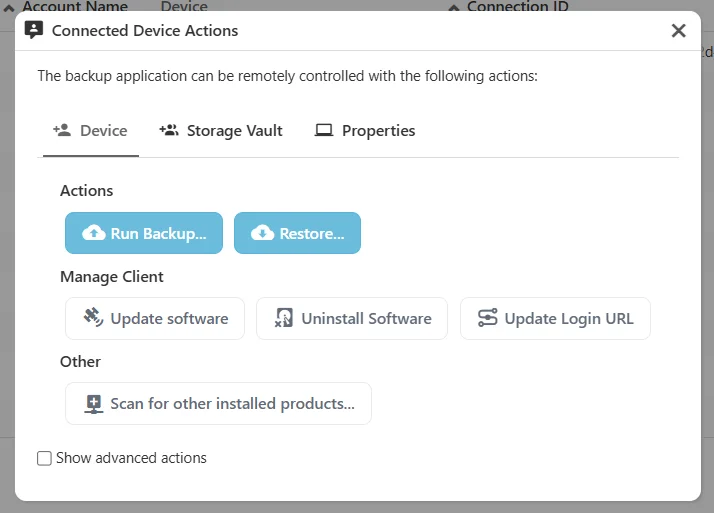
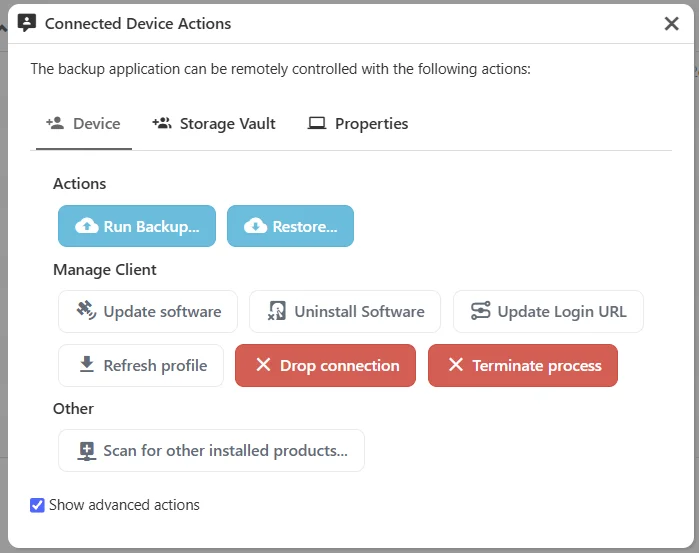
Show advanced actions in the Device Actions dialog
A new Show advanced actions option is available in the Device Actions dialog of the Comet Management Console.
Other enhancements
- Improved performance of running retention pass cleanups on Comet Storage Gateway (COMET-1482)
- Reduced load on the Comet Management Console if jobs are scheduled frequently (COMET-59684)
- Improved cancellation of backup and restore jobs using FTP Storage Vaults
- Added support for seamless redirection when attempting to log in to the Comet web interface with external OAuth credentials (COMET-4519)
- Improved Microsoft 365 backup resilience: a SharePoint or OneDrive site that fails an incremental backup now falls back to a full backup of that site instead of being dropped from the snapshot (COMET-60143)
- Microsoft 365 mailbox and SharePoint/OneDrive backups now share a single bounded worker pool with guaranteed shares for each kind, instead of two independent pools (COMET-60143)
- Reduced temporary-disk and memory usage when a Comet Server Storage Role forwards large uploads to an S3-compatible backend, by streaming the data through to the provider instead of spooling each upload to a temporary file first
- Migrated Microsoft 365 mailbox restores from the Exchange Web Services (EWS) API to the Microsoft Graph API, improving restore performance (COMET-5867)
- Added a prompt to the Comet Backup desktop app when a user policy change is made that requires user consent (COMET-59416)
- Storage Vault content statistics measured during a retention pass now use exact on-disk pack sizes instead of index estimates; reported values may shift slightly after upgrading (COMET-60144)
- Reduced memory usage and improved the speed of Microsoft 365 mail backups through batch streaming (COMET-60111)
- Significantly reduced the RAM required to restore or browse a single snapshot (COMET-3533)
- Significantly reduced peak memory use and CPU time when saving a backup snapshot's directory tree. This most affects Office 365 Protected Items with very large mailboxes, calendars, or SharePoint site lists (COMET-60370)
- Allow configuring X-Forwarded-For and SMTP SSRF protection via the Comet Core web interface settings page (COMET-2410)
- Added safety measures to defend against concurrent changes to a user profile in the Comet Management Console web interface (COMET-1493)
- Improved the Test Connection result on the Proxmox restore destination page of the Comet Backup desktop app to prompt for a destination node and storage target when they have not yet been selected (COMET-5839)
- Improved the speed of backup jobs that run while a retention pass is in progress (COMET-60193)
- Table view settings in the Comet Management Console (visible columns, sorting, page size, and the group-view toggle) are now kept when upgrading Comet Server, instead of being reset on every upgrade. If a table's columns changed in the new version, only the settings for the changed columns are reset (COMET-60015)
- The
engine1/mysqlEngineProps keys are now documented in the SDK docs (COMET-60200) - Updated the Comet Management Console API to report details about invalid parameters in many cases (COMET-60493)
- Duplicating a Protected Item in the Comet Backup desktop app now selects the new copy (COMET-60631)
- Improved the clarity of administrator account permissions in the Comet Management Console (COMET-59380)
- Unlocking a Storage Vault now also removes damaged lock files, and reports an error instead of success if some locks could not be read (COMET-60518)
- Updated the OpenSSL library bundled with the VMware (VDDK) support on Windows to a newer 3.0.x release (COMET-5831)
- The Comet Backup desktop app now runs Storage Vault search, email preview, retention passes, index rebuilds, and snapshot and file deletion through the background service, instead of starting them as the logged-in user (COMET-60727)
- Improved the startup performance of restoring data, if only a few files were selected (COMET-60793)
- Improved the job log message when a restore to VMware vSphere fails while creating or registering a VM, so it includes the detail reported by vCenter and the host and resource pool used (COMET-5517)
- Improved the job log message when a Hyper-V backup fails while creating a checkpoint, so it includes the detail reported by Hyper-V (COMET-61007)
- Storage Vaults created from a Storage Template that refers to "This Server" now keep the "This Server" address instead of the server's URL at the time of creation, so they keep working when the Comet Server is first opened on
127.0.0.1or its external address changes. A warning is shown before choosing "This Server" for an account that has older devices (COMET-1871) - Updated the Portuguese (Brazil) translation (COMET-60781)
Bug Fixes
- Fixed an issue with not continuing to retry jobs in some situations where other work was scheduled around the same time (COMET-59684)
- Handle duplicate file errors gracefully during backup (COMET-60104)
- Fixed a cosmetic issue with inconsistent tree view components in the Comet Management Console (COMET-5546)
- Fixed macOS clients built without a code-signing certificate losing their Full Disk Access permission after every automatic update. The background service is now given a stable signing identity so the granted permission is retained across upgrades (COMET-60147)
- Fixed a crash in the admin user group retrieval API (
/api/v1/admin/user-groups/get) that occurred when an administrator requested a user group belonging to an organization they did not have access to (COMET-59839) - Fixed an issue where an invalid Comet Server configuration submitted via the AdminSetServerConfig API returned a generic server error instead of a validation error describing the problem (COMET-1637)
- Fixed an issue with file and Disk Image restores recreating the full original directory hierarchy inside the restore destination. Selected items are now restored directly under the chosen destination folder, and the restore no longer alters the permissions or timestamps of the destination folder itself (COMET-59535)
- Fixed an issue where the Set User Profile and Reset Password API responses for device and end-user web sessions included administrator-only profile metadata and other devices' Protected Item configuration. The responses now return the same filtered profile view as the corresponding Get User Profile APIs (COMET-60290)
- Fixed an issue where client installation errors were not displayed when logged in as an administrator (COMET-59361)
- Fixed an issue with uploading large files to WebDAV (COMET-2051)
- Fixed an issue with missing options when performing granular restore in simulate mode (COMET-59540)
- Fixed an issue with missing error messages when remotely starting a restore from older client that does not support the restore type (COMET-2051)
- Fixed an issue with invalid wizard page transitions in the Restore dialog in the Comet Backup desktop app (COMET-2051)
- Fixed an issue with retrieving job logs via certain MCP tools (COMET-60322)
- Fixed an issue with MCP instruction accuracy provided to LLMs (COMET-60322)
- Fixed malformed Comet Storage Gateway bucket paths being reported as retryable server errors instead of invalid requests
- Fixed a file-descriptor leak when reading or downloading Comet Server log files via the admin API (COMET-59801)
- Fixed a crash when creating a non-OIDC external admin authentication source (such as LDAP) on Comet Server (COMET-59801)
- Fixed a data race in Comet Server email-queue statistics reporting (COMET-59801)
- Fixed an issue where Comet Server webhook delivery workers were not stopped when webhook targets were reconfigured, leaking workers that continued attempting delivery. As a result of this fix, saving an organization's configuration now restarts that organization's webhook delivery workers, so any webhook deliveries queued for that organization are re-attempted from scratch (even when the webhook targets themselves were unchanged) (COMET-59801)
- Fixed the Comet Server admin log-download API silently returning a partial archive when a log file could not be read (COMET-59801)
- Fixed a file-descriptor/connection leak in Comet Server webhook delivery (response bodies were not closed) (COMET-59801)
- Fixed a file-descriptor leak in the Comet Server admin resource-upload API (the uploaded file handle was not closed) (COMET-59801)
- Fixed a file-handle leak in Comet Server's file-based event stream (e.g. the audit log) when an organization's configuration was reloaded (COMET-59801)
- Fixed a security issue if Comet Management Console was configured to send email via a malicious SMTP server, by adding SSRF protection (COMET-60348)
- Fixed the Restore button being enabled in the Comet Backup desktop app before a destination node and storage target were selected for a Proxmox restore, which caused the restore job to silently never start (COMET-5839)
- Fixed the Comet Backup desktop app allowing a Proxmox restore to start with an empty server address, and keeping a stale node and storage selection when the server address was changed (COMET-5839)
- Added validation to the Restore dialog of the Comet Management Console to require a server address, destination node, and storage target before starting a Proxmox restore (COMET-5839)
- Fixed the private key field on the Proxmox destination page of the Restore dialog in the Comet Management Console being a single-line field that could not hold a multi-line key (COMET-5839)
- Fixed Proxmox storage target names containing unusual characters being truncated when starting a restore from the Comet Management Console (COMET-5839)
- Improved the error message when a Proxmox restore job is started without a storage target, failing immediately with a clear message instead of partway through the job (COMET-5839)
- Fixed an issue where backup jobs could repeatedly log "not present in any index" warnings and fall back to re-reading unchanged data, losing CBT / incremental performance for Hyper-V, Proxmox, and VMware Protected Items (COMET-60193)
- Fixed an issue where a Disk Image restore to physical disks could overwrite the running operating system's disk, crashing the device partway through the restore. The restore now fails upfront with instructions to boot from the recovery media, and the Restore dialogs of both the Comet Backup desktop app and the Comet Management Console grey out the operating system's devices (COMET-59987)
- Fixed an issue where incremental backups of a SharePoint site or Team silently omitted its document libraries when the Protected Item had the SharePoint service selected but the OneDrive service deselected. The first backup was complete, but every subsequent backup dropped the libraries while still reporting a successful job. Affected Protected Items recover automatically on their next scheduled backup; no reset or reconfiguration is required (COMET-60316)
- Fixed an issue with detecting write failures to a Storage Vault (COMET-60511)
- Fixed an issue where a custom
known_hostsfile path configured for a Proxmox Protected Item was discarded when the Protected Item was saved again, in both the Comet Backup desktop app and the Comet Management Console (COMET-60593) - Added the missing host-key verification options when editing a Proxmox Protected Item in the Comet Management Console, matching the options already available in the Restore dialog. Previously the Comet Management Console had no control for these and would reset host-key verification to "Allow any host key" on save (COMET-60593)
- Fixed an issue where editing a Proxmox Protected Item in the Comet Management Console would discard its exclusion list, and reset its backup method and Changed Block Tracking setting, if the device was offline or the connection test had failed (COMET-60593)
- Fixed an issue where Proxmox disks numbered 10 and above were silently excluded from a backup job when the Protected Item was configured in the Comet Management Console (COMET-60593)
- Fixed an issue with the Comet Backup desktop app crashing when opening a Proxmox Protected Item if one of its selected disks had been detached from the guest since the Protected Item was last saved (COMET-60593)
- Fixed an issue where an SSH private key entered when editing a Proxmox Protected Item in the Comet Management Console was discarded on save, and where a Proxmox Protected Item using private key authentication could not be saved or have its connection tested at all. The Private key field is now a multi-line box, so a pasted key keeps its line breaks instead of being flattened into an unusable single line (COMET-60593)
- Fixed an issue where editing a Proxmox Protected Item in the Comet Management Console while the device was offline discarded changes to the SSH server address, username, password and authentication mode (COMET-60593)
- Fixed an issue where the Password and Private key fields shown when editing a Proxmox Protected Item in the Comet Management Console did not match the saved authentication mode until the mode was changed by hand (COMET-60593)
- Added validation preventing a Proxmox Protected Item from being saved with custom host key verification selected but no known_hosts file path entered, which previously caused every backup job for that Protected Item to fail (COMET-60593)
- Fixed a connection leak in the backup client: an HTTP error response from the server left the response body unclosed, so a repeatedly failing job log upload leaked one connection per retry attempt (COMET-60468)
- Fixed an issue causing "Couldn't look up properties of" errors in the Comet Server log when multiple operations occur simultaneously against a single Storage Vault stored in the Comet Server Storage Role (COMET-995)
- Fixed an issue causing "Server already received a more recent progress update, back off" errors in the Comet Server log for backup jobs finishing at particular times (COMET-995)
- Fixed an issue where a backup job could be incorrectly shown as running again after it had already finished (COMET-995)
- Fixed an issue where a simulated Office 365 restore incorrectly reported that no files were restored (COMET-60462)
- Fixed an issue with handling network or server outages on FTP, WebDAV, Storj, and Spanned storage targets (COMET-60520)
- Fixed an issue with generating a Windows client installer if invalid codesigning credentials were supplied (COMET-60715)
- Fixed an issue where policy backup rules targeting SMB, WebDAV or Storj Storage Vault types did not create a schedule for matching Storage Vaults. Existing policies with such rules will now create them (COMET-2248)
- Fixed the guest quota warning not appearing when first opening a VMware or Hyper-V Protected Item configured to back up all VMs in the Comet Backup desktop app (COMET-60510)
- Fixed the connection test for VMware, Proxmox and MongoDB Protected Items reporting success in some cases where the server could not actually be reached, in the Comet Backup desktop app (COMET-60510)
- Fixed an issue where two Protected Items with the same name could swap positions in the sidebar of the Comet Backup desktop app whenever the list refreshed (COMET-60631)
- Fixed IDrive e2 Storage Vaults looking up their regional endpoint on every connection, including when the endpoint was already known. Backup, restore and retention jobs on these Storage Vaults no longer depend on the IDrive e2 endpoint discovery API being reachable, and a job that does still need the lookup now fails in seconds rather than hanging for up to 20 minutes when that API is slow (COMET-60617)
- Fixed an issue with extra "Failed to check for running jobs locally" error messages in cases where a Storage Vault is being used concurrently (COMET-60518)
- Fixed an issue where a lock file that could not be read was ignored when checking whether a Storage Vault was in use (COMET-60518)
- Fixed an issue where a backup job with "Skip if already running" enabled could start a duplicate job if the running job refreshed its lock at the same time (COMET-60518)
- Fixed a cosmetic issue with timezone handling when browsing snapshot dates in the Comet Backup desktop app (COMET-60510)
- Fixed an issue with "CreateFile failed: 231" error messages in the Comet Backup desktop app (COMET-60510)
- Fixed an issue where the "All VMs" label in the Proxmox Protected Item selector of the Comet Management Console was not translated (COMET-60761)
- Fixed an issue causing granular restores to hang when using Comet Server Storage Vaults (COMET-60757)
- Fixed an issue with jobs using the "Prefer temporary files instead of RAM (slower)" setting failing to find existing data if an index file was removed by a concurrent retention pass while the job was loading the Storage Vault index (COMET-60749)
- Fixed an issue with automatic Office 365 registration of a China tenant storing the wrong region, which caused later backups to fail (COMET-60541)
- Fixed an issue where VMware vSphere backups on Windows ignored the port in the vSphere connection's Server field when connecting for virtual disk downloads, causing the download to fail or to connect to the wrong service (COMET-60568)
- Fixed an issue where the retry using temporary files for indexes after an out-of-memory failure did not run for SQL Server, Exchange EDB, Hyper-V, Windows Disk and VMware jobs that run in an elevated process (COMET-60733)
- Fixed an issue where a retention pass could be wrongly retried as an out-of-memory failure after an earlier backup process was killed (COMET-60733)
- Fixed an issue where the Comet Backup desktop app showed no error when the background service refused to start a job, and could then bring an unrelated later job into focus (COMET-60727)
- Fixed an issue where registering a device with an already-registered device ID would silently overwrite the existing device. The
/api/v1/user/device/addAPI now rejects this request with "This device is already registered" (COMET-60294) - Fixed an issue with automatic Storage Vault unlocking that could cause bucket mismatch (COMET-60711)
- Fixed an issue where changes made to a Storage Vault during an automatic key rotation could be reverted (COMET-60711)
- Fixed an issue with safe vault autounlock if a destination location has more than one access key at its provider (COMET-60612)
- Fixed an issue with not finding Backblaze B2 application keys to delete (COMET-60613)
- Fixed an issue with safe vault autounlock if multiple jobs trigger the rotation concurrently (COMET-60612)
- Fixed an issue where safe vault autounlock could leave a Storage Vault inaccessible if clearing its locks failed after its access keys were rotated (COMET-60612)
- Fixed an issue where the loading overlay stayed on screen after a failed bucket deletion on the Storage Buckets page (COMET-3289)
- Fixed restoring a Proxmox VM to Hyper-V or VMware failing with "mbr bad signature" when a virtual disk had no partition table (COMET-5760)
- Fixed restoring a Proxmox VM to Hyper-V or VMware failing when a CD-ROM ISO was attached at backup time (COMET-5760)
- Fixed an issue where restoring to VMware vSphere through vCenter could fail with "do not belong to the same compute resource" when the datacenter has more than one cluster or standalone host (COMET-5517)
- Fixed Office 365 restore duplicating calendar events that were still present at the destination (COMET-60209)
- Fixed Office 365 mail restore to an existing custom folder placing folders in the mailbox root after the mailbox was recreated (COMET-60209)
- Fixed an issue in the Comet Backup desktop app where, in languages other than English, some "..." browse buttons and ":" separator labels displayed translation file metadata instead. This affected the Storage Vault location settings, the MongoDB, MySQL, Proxmox and VMware Protected Item settings, and the SSH tunnel dialog
- Fixed an issue with searching for 'Email' in the Comet Server web interface taking you to a blank page (COMET-60857)
- Fixed an issue with the Comet Management Console pausing for 10 seconds while loading when opened from another website (COMET-11162)
- Fixed an issue where custom branding could make the active tab titles and sorted table column headers unreadable in dark mode in the Comet Management Console (COMET-5567)
- Fixed an issue resulting in Synology SPK installer files not being correctly cleaned up on disk when running Comet Server in Windows (COMET-60764)
- Fixed an issue where Comet Server admin API calls with a
TargetOrganizationthe admin is not authorized for returned status 500 instead of 403 (COMET-59942) - Fixed an issue with Proxmox VM backups where, if committing the copy-on-write overlay back into the base image failed, the overlay stayed attached to the VM and was not reported. The commit is now retried and the failure is reported (COMET-60586)
- Fixed an issue where administrators could not log in to the Comet Management Console with newer FIDO2 security keys that require user verification (PIN or biometrics). User verification is now requested as "preferred" (COMET-61009)
- Fixed an issue where the text of secondary buttons was invisible in light mode in the Comet Management Console (COMET-60861)
Changes compared to 26.8.10
- None