26.8.4 ‘Voyager’ released
Changes compared to 26.8.3
New Features
Added an Extra Fields section to the user profile page in the Comet Management Console for free-form content (COMET-60171)
User profiles have supported free-form metadata since Comet 26.2.1, but it could only be edited through the API. The user profile page in the Comet Management Console now has an Extra Fields section for editing it directly, useful for notes, contact details, or IDs linking the user to an external system. Each entry can be marked as admin-only or visible to the end user, and the same key name may be stored at both visibility levels independently.
Added a Test Connection button to the Proxmox destination page of the Restore dialog in the Comet Management Console, testing SSH connectivity via the connected device (COMET-5839)
Previously, a wrong server address or credentials for a Proxmox restore started from the Comet Management Console only surfaced after the job had been submitted. The Proxmox destination page of the Restore dialog now has a Test Connection button, matching the Comet Backup desktop app. The test is relayed through the connected device, so it checks the same SSH connection the restore job itself will use. A successful test with no destination node or storage target selected prompts you to pick them, and a failed test against the Proxmox web interface port (8006) suggests using the SSH port instead.
Enhancements
- Allow configuring X-Forwarded-For and SMTP SSRF protection via the Comet Core web interface settings page (COMET-2410)
- Added safety measures to defend against concurrent changes to a user profile in the Comet Management Console web interface (COMET-1493)
- Added SSH host key verification (known_hosts) options to the Proxmox destination page of the Restore dialog in the Comet Management Console; previously web-initiated Proxmox restores always skipped host key verification (COMET-5839)
- Improved the Test Connection result on the Proxmox restore destination page of the Comet Backup desktop app and the Comet Management Console to prompt for a destination node and storage target when they have not yet been selected (COMET-5839)
- Added a hint when a failed Proxmox test connection in the Comet Management Console used the web interface port (8006) instead of the SSH port (COMET-5839)
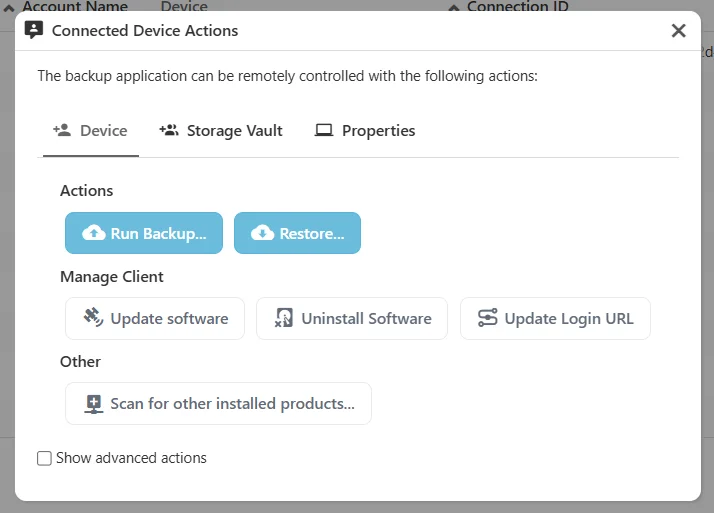
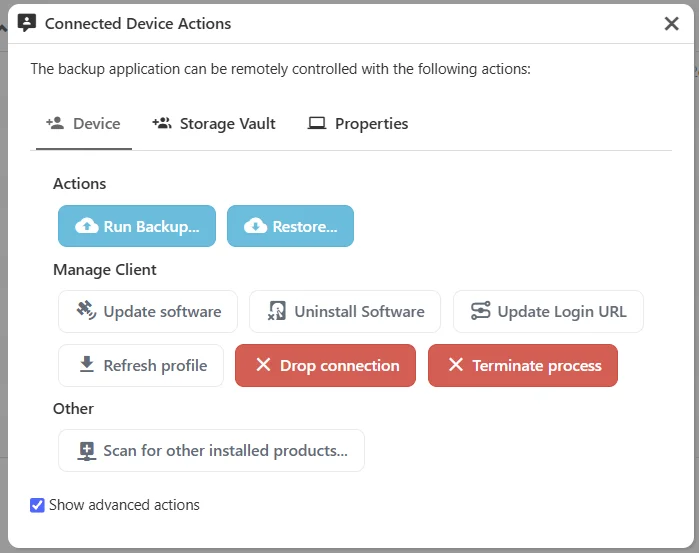
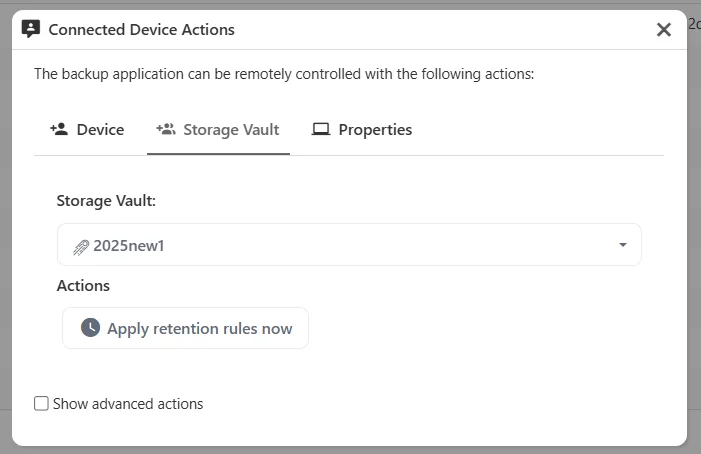
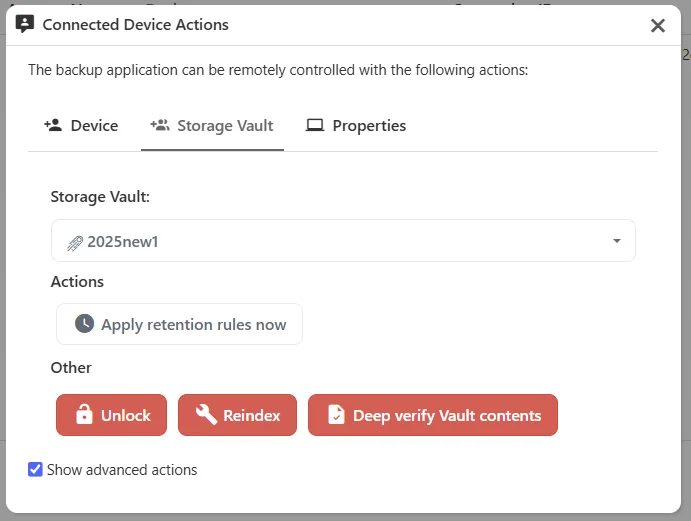
- Add "Show advanced actions" option in the Device Actions dialog in the Comet Management Console (COMET-60453)
- Improved the speed of backup jobs that run while a retention pass is in progress (COMET-60193)
- Added a confirmation prompt in the Restore dialogs of the Comet Backup desktop app and the Comet Management Console, and a job log warning, when a Disk Image restore targets a currently-mounted volume (COMET-59987)
Bug Fixes
- Fixed a security issue if Comet Management Console was configured to send email via a malicious SMTP server, by adding SSRF protection (COMET-60348)
- Fixed the Restore button being enabled in the Comet Backup desktop app before a destination node and storage target were selected for a Proxmox restore, which caused the restore job to silently never start (COMET-5839)
- Fixed the Comet Backup desktop app allowing a Proxmox restore to start with an empty server address, and keeping a stale node and storage selection when the server address was changed (COMET-5839)
- Added validation to the Restore dialog of the Comet Management Console to require a server address, destination node, and storage target before starting a Proxmox restore (COMET-5839)
- Fixed the private key field on the Proxmox destination page of the Restore dialog in the Comet Management Console being a single-line field that could not hold a multi-line key (COMET-5839)
- Fixed Proxmox storage target names containing unusual characters being truncated when starting a restore from the Comet Management Console (COMET-5839)
- Improved the error message when a Proxmox restore job is started without a storage target, failing immediately with a clear message instead of partway through the job (COMET-5839)
- Fixed an issue where backup jobs could repeatedly log "not present in any index" warnings and fall back to re-reading unchanged data, losing CBT / incremental performance for Hyper-V, Proxmox, and VMware Protected Items (COMET-60193)
- Fixed an issue where a Disk Image restore to physical disks could overwrite the running operating system's disk, crashing the device partway through the restore. The restore now fails upfront with instructions to boot from the recovery media, and the Restore dialogs of both the Comet Backup desktop app and the Comet Management Console grey out the operating system's devices (COMET-59987)
- Fixed an issue where incremental backups of a SharePoint site or Team silently omitted its document libraries when the Protected Item had the SharePoint service selected but the OneDrive service deselected. The first backup was complete, but every subsequent backup dropped the libraries while still reporting a successful job. Affected Protected Items recover automatically on their next scheduled backup; no reset or reconfiguration is required (COMET-60316)
- Fixed an issue where a Protected Item covering a user's personal OneDrive captured that OneDrive during a full backup even when the OneDrive service was not selected, and then dropped it from every subsequent incremental backup. The OneDrive service selection is now honoured consistently by both full and incremental backups. Note that where this previously resulted in unselected personal OneDrive data being captured, that data will no longer be included in new backups; a warning is now logged whenever content is skipped for this reason (COMET-60316)