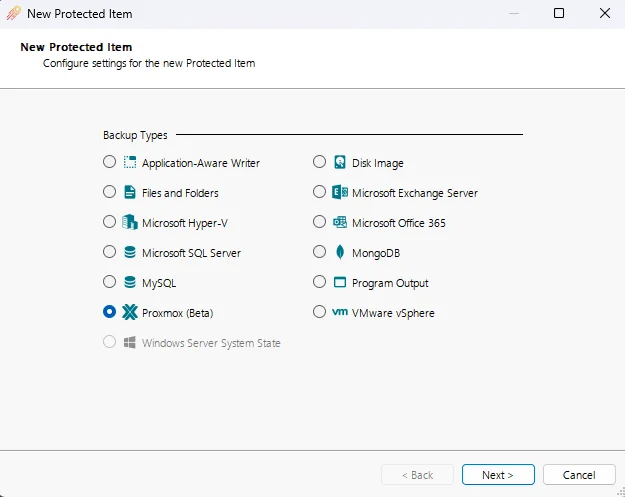
Proxmox restores can now be performed to Ceph/RBD storage.
Changed block tracking for Proxmox protected items
Changed block tracking (CBT) is now supported for Proxmox Protected Items, allowing for significantly reduced job times when backing up low-churn datasets.
Fixed an issue processing changes by administrators
Fixed an encoding issue in the Comet Management Console web interface
Fixed an issue processing changes by tenant administrators
Fixed an issue leading to incorrect date selections when configuring a monthly schedule in the Comet Backup desktop app
Fixed an issue with future Deep Verify operations on a Storage Vault being blocked if multiple jobs tried to simultaneously initialize the vault on its first use
Fixed an issue leading to inaccuracies in SMB-backed Storage Gateway disk size reporting
Fixed an issue in the Comet Management Console web interface causing the header for the size column to be formatted incorrectly in exported job history
Fixed an issue in the Comet Management Console web interface affecting the human readable formatting of 'n/a' duration values in exported job history
Fixed an issue building device associations when creating custom Storage Vaults from the Comet Management Console
Fixed an issue causing Windows Disk Image backups to fail on host devices with Windows Containers enabled
Fixed an issue with Comet attempting to backup external VSS snapshots in a Windows Disk Image backup
Fixed an issue with missing warning messages when manually starting cometd.exe on Windows outside of a service context
Fixed a cosmetic issue with the window size changing when editing a Proxmox Protected Item from the Comet Backup desktop application
Fixed an issue with 'Invalid Authentication' errors when a user profile has many thousands of Protected Items and/or Storage Vaults
Fixed an issue with process argument visibility when using the Comet Backup desktop application
Fixed an issue with unresponsive cancellation when accessing a remote Proxmox VE server
Improved the handling of failed message downloads during Office 365 backups by falling back to alternative retrieval methods
Fixed an issue with the Comet Backup agent failing to open Storage Vaults when multiple keys are present
Fixed an issue preventing Comet from restoring a Proxmox VM when not all disks were backed up
Fixed an issue with not respecting the choice of target backup method for Proxmox LXC containers
Fixed an issue preventing the horizontal scrollbar appearing on the user group management page when overflowing
Fixed an issue with timing alignment in some scenarios causing scheduled backups not to start
Titan is the latest entry in our quarterly rollup series. It branches off from our main rolling Voyager development into a fixed target for our partners to qualify and build upon.
This Quarterly release is named after Saturn's moon Titan. Fun fact: Titan, Saturn's largest moon, is the only moon with a substantial atmosphere and the only place besides Earth known to have liquids on its surface, including clouds, rain, rivers, lakes and seas of liquid hydrocarbons like methane and ethane.
As for the software, Comet 25.8.0 Titan, brings 4 new features and 7 enhancements, including a General Access Beta for Proxmox VE Protected Item backup, an MSI Installer for Comet Backup desktop app on Windows, an RPM Installer for Comet Backup desktop app on Linux, and much more.
As always for a new quarterly release, there are two changelogs for 25.8.0 depending on whether you are coming from the previous quarterly release or the previous Voyager release:
To provide more flexibility for installing the Comet Backup desktop application on Windows, Comet 25.6.3 offers a new .msi installer option.
Using a .msi installer is great option for mass deployments and supports all the install features and flags that Comet's .exe installer offers.
Automatically Create New Storage Vaults Using Policies Protected Items
Since Comet 24.12.0, a new user setting has been available to choose if devices that share the same user account login should back up Protected Items to a shared Storage Vault or isolated Storage Vaults.
This has been extended to interact with Comet's Policy system to set Default Protected Items. A Default Protected Item is a great way to ensure Protected Items are automatically created when a new device is registered to a user.
Now, when the Policy setting under the Storage Vaults tab Automatically create Storage Vault for new devices is configured, new devices registered to a user will have a Default Protected Item created and will have a Storage Vault automatically provisioned and ready to back up.
To make the most out of the Default Protected Item feature you will need to set a Schedule when configuring the Default Protected Item.
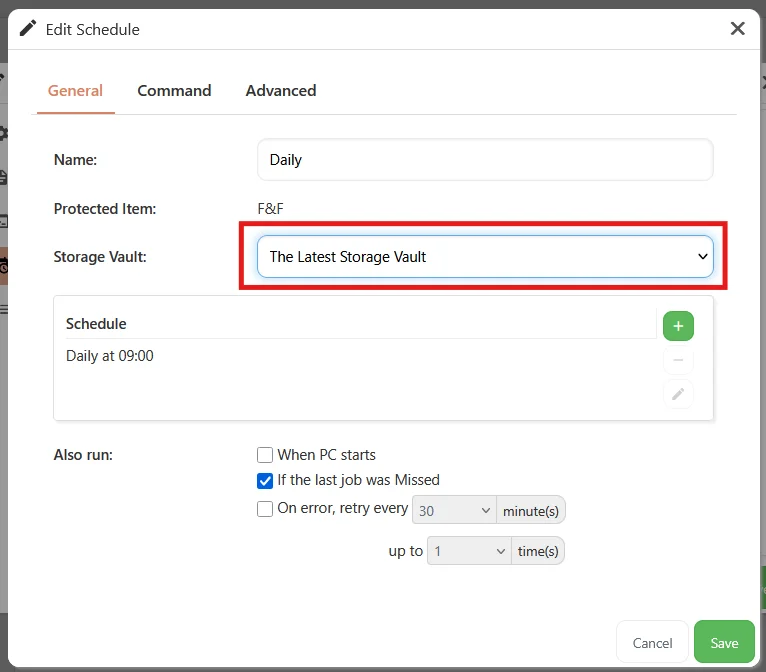
When the Storage Vault for the Schedule is set to The Latest Storage Vault any new device registered to the user with this policy set will automatically have a Protected Item and new Storage Vault created and will back up data to this new Storage Vault based on the Schedule.
Support has been added for Impossible Cloud regions eu-west-2 and eu-north-1.
Linux Disk Image Driver Support for Linux Kernel 6.14
Support for Comet's Linux Disk Image Driver (backupsnap61) has been improved to support Linux Kernel Version 6.14
Specify restore directory when restoring as compressed archive file
When restoring backups to 'Compressed archive file' in a Comet Management Console an improved dialog will be shown. Previously, configuring where the compressed file will be restored to was unclear. If a relative path was entered then the restored file would be in the install directory of the Comet Backup desktop application. Now, the dialog will allow you to browse the local device to select the directory to restore to. A filename will need to be entered and a archive format to be selected. This makes it a lot clearer as to where the compressed archive file will be restored to.
During device registration or when a new Storage Vault is created via the Comet Backup desktop app, the name of the device is now included in the Storage Vault name. This is an big quality of life improvement as it is now much easier to track what Storage Vault belongs to what device, especially if one Storage Vault is being used per device.
In Comet 25.8.0, significant changes have been made to Comet's Storage Gateway.
The first is, on startup Comet will now validate if Storage Gateway has been configured correctly. If not, an updated widget will appear on the Home screen noting that the storage configuration has failed. This means admins can see immediate feedback within Comet to check if a Storage Gateway is configured correctly.
The Storage Gateway settings has also been improved. Comet will now validate Storage Gateway settings before changing them to ensure that it's configured correctly.
New And Improved Look For Snapshot And File Selection
As part of our ongoing efforts to improve the experience of using Comet, this release introduces a new and improved look for snapshot and file selection in the Comet Management Console, with a cleaner layout and more consistent behaviour. The new look can be found in the restore dialog when selecting snapshots and files to restore, as well as in the remote file picker when configuring Protected Items.
In Comet 24.12.0, we made changes to the Users table in the Comet Management Console to support the new User Groups feature. Comet 25.8.0 brings the rest of the tables in the Comet Management Console in line with the Users table, improving consistency and adding a variety of small improvements such as faster table loads, better page navigation in large tables, and inline column filters.
Proxmox Virtual Environment Protected Item General Access Beta
Comet 25.8.0 Titan, our new Proxmox VE Protected Item is now available as a General Access Beta feature.
Proxmox Virtual Environment is a complete, open-source server management platform for virtualization.It tightly integrates the KVM hypervisor, Linux Containers (LXC), software-defined storage, and networking functionality on a single platform. With the integrated web-based user interface you can manage VMs, containers, high availability for clusters, and the integrated disaster recovery tools with ease.