26.8.0 Voyager released
Changes compared to 26.5.4
New Features
Automatically start a Bulk Update Campaign when the Comet Management Console restarts
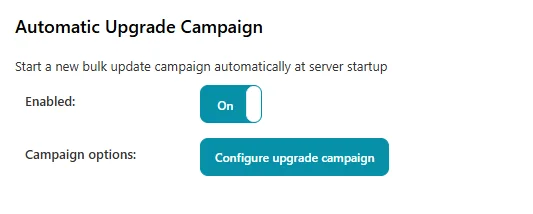
Keeping every device on the latest Backup Agent usually means an administrator remembering to launch a Bulk Update Campaign by hand after each server upgrade. A new Automatic Upgrade Campaign option now does this for you: when enabled, Comet Server starts a fresh Bulk Update Campaign automatically each time the Comet Management Console restarts, rolling the update out across your device fleet with no manual step.
To avoid redundant campaigns caused by quick or repeated restarts, a new campaign is only started if it has been more than 24 hours since the last bulk upgrade campaign.
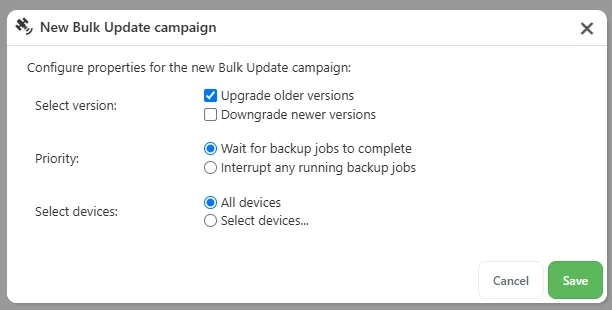
The option is configured by a top-level administrator under the Backup Agent Downloads settings. Turn on the Enabled toggle, then use Configure upgrade campaign to pre-set exactly how the automatic campaign should behave — whether to upgrade older versions and/or downgrade newer ones, whether to wait for running backup jobs to finish or interrupt them, and whether to target all devices or a filtered subset.

Added support for NinjaOne RMM integration
NinjaOne is a unified IT management platform combining RMM, endpoint management, and ticketing. Comet's new NinjaOne integration surfaces backup status directly inside NinjaOne, so you can monitor your customers' backups alongside the rest of their endpoint data instead of switching between tools.
Once configured, Comet writes the outcome of each backup to custom fields on the matching NinjaOne device — Last Backup Status, Last Backup Time, Last Backup Destination, Last Backup Total Size, and the Comet Job ID — refreshed automatically after every job.

Optionally, you can also enable automatic ticketing. When a backup fails, Comet opens a NinjaOne ticket against the affected device, with a link back to the Comet job log and a summary of the run. Repeated failures on the same device and Protected Item add a comment to the existing ticket and escalate its severity rather than creating duplicates, and when the next backup succeeds Comet resolves the ticket automatically with a resolution comment.


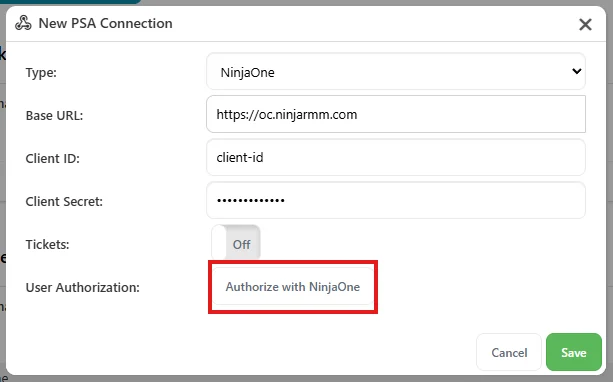
The integration is configured under Settings → Integrations in the Comet Management Console and requires the NinjaOne Agent on each device. For full setup instructions, see the NinjaOne integration guide.
Enhancements
- Improved performance of running retention pass cleanups on Comet Storage Gateway (COMET-1482)
- Reduced load on the Comet Management Console if jobs are scheduled frequently (COMET-59684)
- Improved cancellation of backup and restore jobs using FTP storage vaults
- Added support for seamless redirection when attempting to log in to the Comet web interface with external OAuth credentials (COMET-4519)
Bug Fixes
- Fixed an issue with not continuing to retry jobs in some situations where other work was scheduled around the same time (COMET-59684)
- Fixed an issue where restoring a Proxmox virtual machine onto ZFS storage could fail with "dataset already exists" if a leftover disk volume from a previous restore or an earlier VM with the same VM ID was present on the storage pool (COMET-60116)
- Handle duplicate file errors gracefully during backup (COMET-60104)
- Fixed an issue where the Storage Vault content analysis at the end of a retention pass could fail permanently once concurrent jobs had left duplicate packindex files for a snapshot (COMET-60135)
- Fixed an issue with rate limit message handling on S3-compatible storage locations (COMET-59536)
- Fixed Linux Disk Image snapshot driver installation on systems where the default temp directory is mounted
noexec(COMET-59078) - Fixed Linux Recovery Media ISO generation on systems where the default temp directory is mounted
noexecornodev(COMET-59078)