SECURITY NOTICE: This version of Comet Server fixes an important security issue related to administrator accounts. If you share your Comet Server with tenant administrators or limited-permission administrator accounts, we strongly recommend upgrading at the earliest possibility.
SECURITY NOTICE: This version of Comet Server fixes an important security issue related to administrator accounts. If you share your Comet Server with tenant administrators or limited-permission administrator accounts, we strongly recommend upgrading at the earliest possibility.
Fixed an issue when no snapshot is selected before searching for items to restore.
Fix a cosmetic issue on the Comet Server web interface. When selecting an output directory for a restore the browse button should be disabled according to the relevant policy setting.
Fix an issue with 'http: URL query contains semicolon ...' being logged by the Comet Server.
Ananke is the latest entry in our quarterly rollup series. It branches off from our main rolling Voyager development, into a fixed target for our partners to qualify and build upon.
Like Comet's previous recent quarterly software releases, "Ananke" is named after a moon of Jupiter, discovered as recently as 1951. It's the largest moon of the "Ananke group", a set of seven of the moons of Jupiter that have similar orbits and are thought to have a common origin. The moon is named after the ancient Greek mythological goddess of inevitability and necessity.
Ananke brings 12 features and 20 enhancements, including a new design for the Comet Backup desktop app; streaming restores for MySQL and Microsoft SQL Server; new integrations with Storj.io and Gradient MSP; the ability to move users between tenants, and more.
As always for a new quarterly release, there are two changelogs for 22.11.0 "Ananke" depending on whether you are coming from the previous quarterly release or the previous Voyager release.
Remove support for running the Comet Backup client on Windows Vista, Windows Server 2008, and macOS 10.10 "Yosemite". The new minimum version is Windows 7, Windows Server 2008 R2, and macOS 10.11 "El Capitan"
The Authenticode certificate used by Comet has been renewed. When installing the Windows version of Comet Server or Comet Backup, you may see Windows Defender Smartscreen prompts for approximately one week as the replacement certificate builds reputation.
Webhook and websocket events for the top-level Tenant will now include events from tenants
New design for the dashboard screen in the Comet Backup desktop app
Support Comet Backup for macOS on Apple Silicon (M1 / M2)
Support Gradient MSP as a PSA platform.
Gradient MSP is an external service that allows you to sync user account data and backup job error alerts into many RMM/PSA systems including ConnectWise, Autotask, Kaseya, Syncro, Pulseway RMM, HaloPSA and more. For more information, please see https://support.meetgradient.com/comet-backup
Added a top-level download button to the navigation bar on the Comet Server web interface
Added the ability to duplicate Protected Items in the Comet Backup desktop app
User can now be transferred between tenants via API or web interface. Main organization's default Organization Name will be Comet Server Operator Organization unless overridden by Company Name under Branding
Microsoft SQL Server backups can now be restored directly into MSSQL Server
Added ability to restore MySQL backups directly into a MySQL server, without spooling
Add Backup Now for self-backup targets, in the Comet Server web interface
Support Storj.io as a Storage Vault location and as a Storage Template provider
Added an API to create a self-backup export for a single tenant
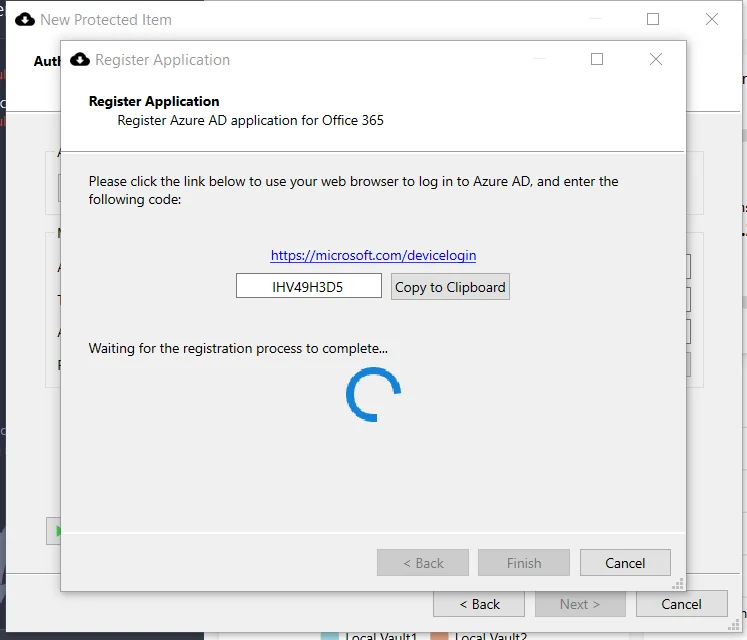
Added "copy to clipboard" button for the Office 365 setup process
Option to filter live event event messages when constructing a Websocket, by using query parameters (e.g. ?allowList=4100)
Improved TLS ciphersuite selection in Comet Server's built-in HTTPS server
Various improvements to the Comet Server web interface's UI
Support the 'hide files instead of deleting them' option for Backblaze B2 in Constellation, to hide unused customer buckets and rely on B2 lifecycle policies for delayed cleanup
Reduce maximum concurrent installer generations to one less than the number of CPU cores, to prevent large Bulk Update Campaigns from slowing down the Comet Server
Custom commands (Before/Thaw/After, or Program Output backup, or Program Input restore) will no longer act as if Comet's $PWD is in $PATH
Webhooks can now be viewed, created, and edited through the Comet Server settings page, including as a Tenant admin
Previously this was only possible through API or hand editing the server config file.
Cosmetic add icons to the Storage Template configuration settings in the Comet Server web interface
Cosmetic redesign the New Storage Vault dialog in the Comet Backup desktop app to use a wizard
This brings the behavior in line with creating new Protected Items in the Comet Backup desktop app: a wizard is used for initial creation, to help guide you through the process, but after initial creation a tabbed dialog is used, for quickly jumping to any setting.
Cosmetic redesign the Search dialog in the Comet Backup desktop app to use a wizard, allowing easier back navigation
Minor improvements to performance and memory usage
Improve performance when deleting an entire Tenant via the Comet Server API
Improve performance of compressing data during backup jobs
Improve performance of Disk Image backup on drives with large amounts of free space sectors
Improve performance of Storage Role replication by increasing the number of worker threads
Improve performance of looking up job history for servers with many user profiles
Reduce memory usage requirements for Comet Server Storage Role when processing a large file upload
Reduce filesize for downloading the Comet Backup installer for Windows