22.6.4 ‘Voyager’ released
· One min read
Changes compared to 22.6.1


Changes compared to 22.5.1
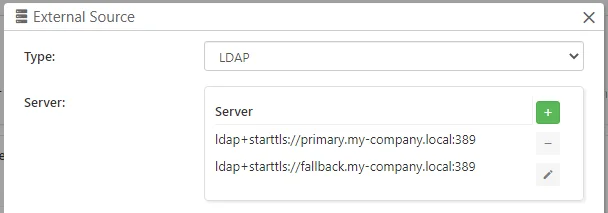
Comet Server supports using external authentication sources for admin accounts. If you have a highly-available LDAP server infrastructure using multiple servers, such as an Active Directory failover cluster with primary/fallback domain controllers, you are now able to configure multiple LDAP server addresses in Comet Server. When an admin user tries to authenticate at the Comet Server login screen, if a connection to the first entry on the list fails, Comet will try the remaining entries on the list before denying the authentication attempt.
Update Thai translation
Improve handling of temporary files on Synology devices using the SPK client installer
During backup jobs, Comet saves some temporary files in the system temporary directory. In the Synology DSM operating system, the default directory for temporary files (/tmp) is a RAM disk. With this change, Comet switches to use a custom temporary directory. This reduces the RAM requirements for running Comet Backup on Synology devices, meaning that large backup jobs on RAM-constrained Synology devices will no longer cause slowdown or freezes due to running out of RAM.
Thank you to our partners for getting the Chinese (Traditional) localization started! The best-quality translations come from our customers, who better understand the software and the backup industry. We appreciate any translation assistance that is offered.
If you want to correct a translation in Comet, or if you want to translate Comet into a new language, further information is available via CometBackup/translations at GitHub.

This release comes with two key improvements to server self backup. Using the new slider component you can select 'faster' or 'smaller' to optimize the compression levels for the backup. A new option has been added to exclude the job database from the Comet Server self backup. It is best practice to keep regular backups of your comet server. Some very large databases can cause this to be a high cpu operation. In this case, we recommend having two backup schedules, one very regular backup that excludes the job database and another less regular backup that includes all databases.

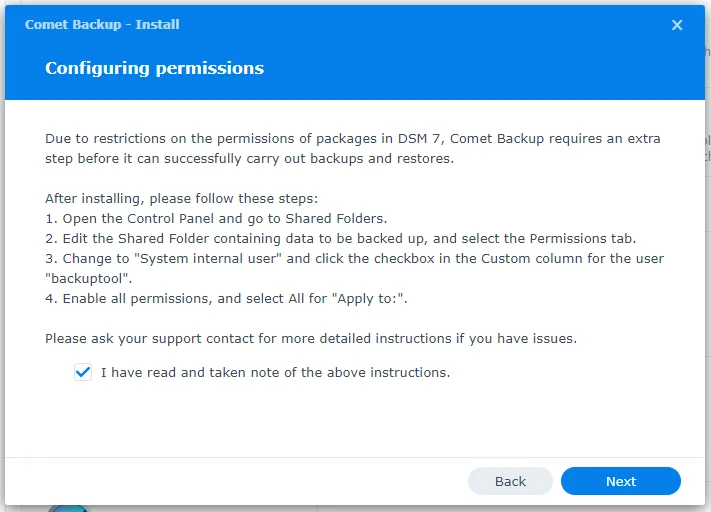
We have also improved the onboarding experience for DSM-7. There is added guidance on how to configure permissions in the DSM 7 Synology SPK for the Comet client
Changes compared to 22.3.5
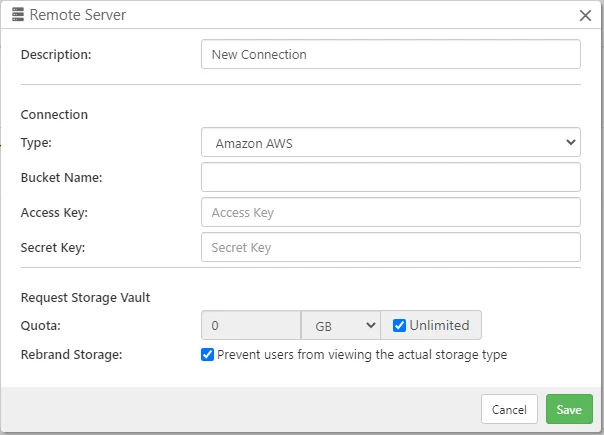
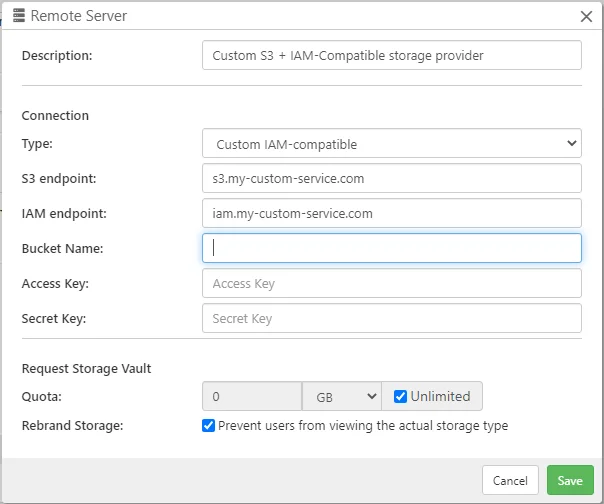
Comet Backup supports many different cloud storage providers (e.g. SFTP or S3-compatible) if you bring your own storage credentials. If you have configured Comet Backup to back up directly to a cloud storage provider, you should avoid reusing storage credentials across customers. For each customer, you should either create new cloud storage credentials manually; or proxy the data through Comet Server Storage Role; or ideally, have Comet Server allocate new cloud storage credentials automatically. Previous versions of Comet Server supported this "Requestable" provisioning for Backblaze B2, Wasabi Cloud Storage, and custom HTTP integrations. The latest version of Comet Server extends this support to Amazon AWS and to custom IAM-compatible cloud services.
Changes compared to 22.3.4

Fix an issue with the time zone of Synology devices being detected by Comet as UTC even when the device is set to another time zone
Fix an issue with email reporting table allowing duplicate email entries


Changes compared to 22.3.3
Changes compared to 22.3.2