26.11.3 Voyager released
Changes compared to 26.11.2
Comet 26.11.3 lets an admin API token be supplied as the password when authenticating to the Comet Server API, so API tokens now work with the existing Comet Server SDKs and MCP server without any client changes. The Comet Management Console now warns admins who sign in through a single sign-on provider about how two-factor authentication applies to them, and warns when the Download Backup Agent page or the default server URL uses a loopback address. This release also fixes Comet Server and the Comet Backup background services not stopping cleanly on Windows, Microsoft SQL Server restores ignoring the WITH NORECOVERY option, retention passes on IDrive e2 Storage Vaults with versioning or Object Lock, and creation times shown as January 1970 for items created in the Comet Backup desktop app.
Enhancements
-
Added support for authenticating to the Comet Server API with an admin API token supplied as the password, so API tokens can now be used with the existing Comet Server SDKs and MCP server without any client changes (COMET-60524)
-
Added warnings about two-factor authentication on the My Account page of the Comet Management Console for admins who sign in through a single sign-on provider. If the provider is configured to skip two-factor authentication, the warning states that the account's own two-factor authentication settings are ignored; otherwise, it notes that the provider may also require two-factor authentication (COMET-61292)
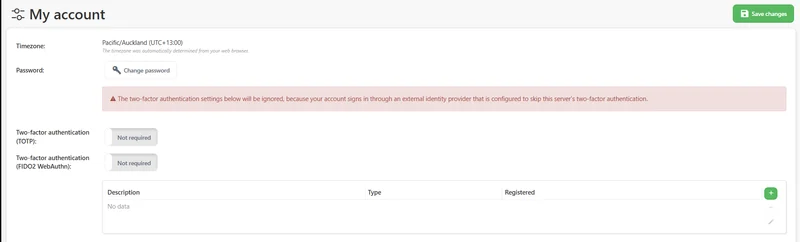
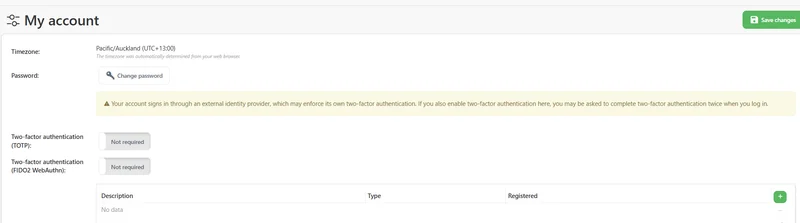
-
Added a warning on the Download Backup Agent page of the Comet Management Console when an admin opens the page from a loopback address (COMET-1171)
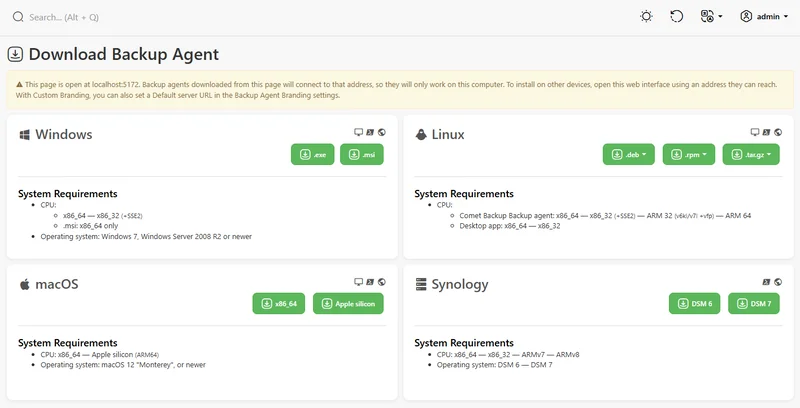
-
Added a warning below the Default server URL field in the Backup Agent Branding settings when the address is a loopback address (COMET-1171)


Bug Fixes
- Fixed an issue on Windows where stopping the Comet Server service could leave the Comet Server process running, causing the next start to fail with a license validation timeout (COMET-61172)
- Fixed an issue on Windows where stopping the Comet Backup background services could leave their processes running (COMET-61172)
- Fixed an issue with Microsoft SQL Server restores in the Comet Backup desktop app always using WITH RECOVERY, even when "I want to keep restoring additional files (WITH NORECOVERY)" was selected (COMET-60516)
- Fixed an issue where retention passes on IDrive e2 Storage Vaults with versioning or Object Lock enabled ended with "405 Method Not Allowed" warnings and did not remove unreferenced data held by deleted snapshots
- Fixed an issue with Comet Server crashing at startup when the Storage Role is enabled but its storage cannot be opened, such as an unmounted drive or an unreachable S3 endpoint. The server now starts in the "Storage Gateway failed" state (COMET-61189)
- Fixed an issue where a rejected password reset in the Comet Management Console still acted on connected devices and completed the login. An incorrect current password, or a profile edited elsewhere in the meantime, could push a password that was never saved to every connected device (COMET-60448)
- Fixed an issue with Protected Items, Storage Vaults and schedules created in the Comet Backup desktop app showing a creation time in January 1970, and desktop-created Storage Vaults ranking as the oldest for the "latest Storage Vault" selection rule (COMET-60862)
- Fixed an issue with long-running jobs failing with a "too many open files" error when the "Prefer temporary files instead of RAM (slower)" option is enabled, on devices with a low open file limit (COMET-61330)
- Fixed an issue with a backup job uploading the same index file to the Storage Vault more than once after an earlier index upload failed (COMET-61330)
- Fixed an issue where Comet Server did not record the reason in its log file when it failed to start, for example when it could not open a database (COMET-61178)
- Fixed an issue where admins could not see why a client software installer failed to build on the Downloads page of the Comet Management Console. The error now shows the cause, for example a code-signing failure, with its line breaks (COMET-61235)
- Fixed an issue with a crash in the Comet Management Console when requesting a Storage Vault in the schedule dialog when logged in as an end user (COMET-60292)