26.5.0 ‘Voyager’ released
Changes compared to 26.4.0
Enhancements
Log message aggregation for backup jobs
In Comet 26.5.0, the previous hard cap of 15,000 log messages per backup job has been replaced with an aggregation approach. Up to 1,000 instances of the same warning message are recorded verbatim; after that, a summary entry is appended for every further 1,000 occurrences of the same message. This ensures that new issues are always visible in the job log and makes it easier to confirm that a job is still actively running.


Diagnostic logging status indicator for Files and Folders backups
When Files and Folders diagnostic logging is active, Comet now logs a message at the start of the job to indicate that diagnostic logging is enabled. This is useful when reviewing logs with support and serves as a reminder to disable diagnostic logging when it is no longer needed.

Live item count updates for running backups
The Comet Management Console now shows a live updating item count while a backup job is running, matching the existing behaviour in the Comet Backup desktop app. This gives users an additional way to confirm that a job is making progress when it might otherwise appear to have stalled.

2FA status visible in User list
Admins can now view each user's two-factor authentication (2FA) status directly from the Users list in the Comet Management Console, without needing to open each user's detail page.


Improved offline license quota visibility
The Comet Management Console now displays a warning banner when the offline license quota is exceeded. The offline server license information widget has been moved to the home page, and the quota exceeded warning message has been improved for clarity.
Linux Sandboxing always enabled for home directory restores
Linux Sandboxing is now permanently enabled for Files and Folders restores to home directories, improving security by isolating file write operations from the broader system.
Improved Missed Backup log details
Missed Backup log entries now include additional context about whether the target device was online at the time the backup was expected to run, making it easier to diagnose why a scheduled backup was missed.
Linux Files and Folders restore sandbox performance improvements
Multiple performance optimisations have been applied to the Linux Files and Folders restore sandbox: the sandbox is now bypassed for non-home paths, a Trie data structure is used for fast path matching, LChown and Chmod operations are combined to reduce worker channel round trips, and worker/UID affinity scheduling has been introduced.
Improved Office 365 backup memory efficiency
Office 365 calendar and mail backups now stream events and messages as they are processed rather than collecting them all in memory before starting. This reduces peak memory usage during backups of large mailboxes.
Policy default schedules applied to policy default Protected Items
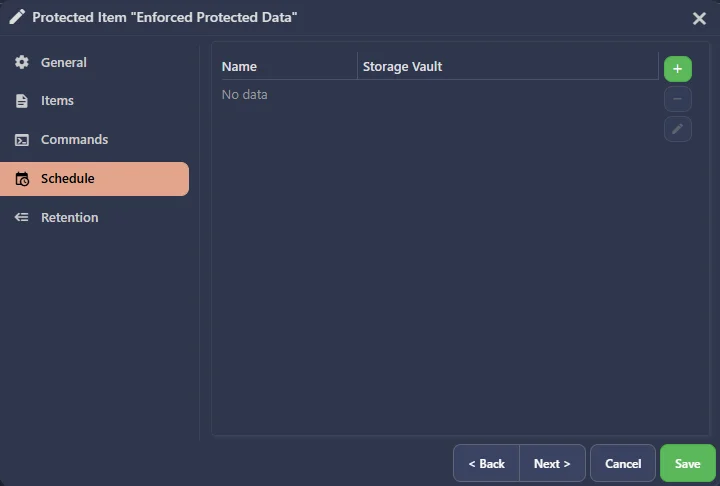
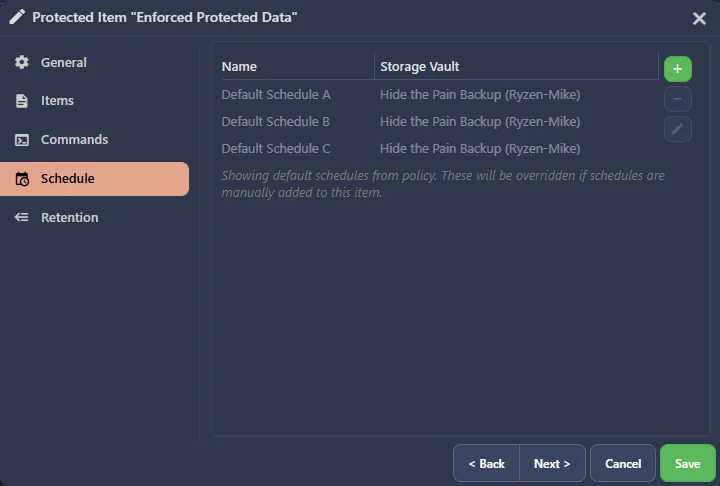
Policy default schedules are now automatically applied to policy default Protected Items that have no schedules of their own configured. For enforced Protected Items, schedules are always applied; for unenforced Protected Items, schedules are applied at Protected Item creation time. Default schedules are shown in a greyed-out, non-interactive state to distinguish them from explicitly configured schedules.
Bug Fixes
- Fixed an issue with Comet API to prevent Admin with enforced policies from creating a policy and/or assigning an existing policy
- Fixed an issue causing VMware virtual disk crashing when restoring root level files
- Fixed an issue causing inconsistent 400 vs 404 response codes in some remote APIs (COMET-59567)
- Fixed an issue causing a second password entry to be required when logging into the Comet Backup desktop app (COMET-5855)
- Fixed an issue causing client-side jobs to not run on schedule in some rare edge cases (COMET-59428)
- Fixed an issue with performance when managing the comet-stats.db database under high server load (COMET-59682)
- Fixed an issue with Comet backup-tool env var injection in the elevator's run-command-elevated endpoint
- Fixed an issue causing vault creation to be blocked for existing Storage Templates configured under tenant organizations
- Fixed an issue with tenant admin account security (COMET-59538)
- Fixed an issue with invalid paths in macOS codesigning using SSH in Comet Core
- Fixed an issue with validating certain types of Relic codesigning responses (COMET-59589)
- Fixed an issue with invalid paths in Comet Server Storage Role (COMET-59556)
- Fixed an issue with generating the Linux Recovery Media on a Linux distribution that uses tmpfs (COMET-59078)
- Fixed an issue with cross-restore from Proxmox to Hyper-V or VMware when a CD-ROM was present in the backup source
- Fixed an issue causing the Comet Backup desktop app job log to show some jobs as in progress when they were actually finished
- Fixed an issue with timestamp boundaries when calculating the time to create Missed backup job entries
- Fixed an issue causing the VM list to be empty when restoring from a VMware backup that had no disks
- Fixed an issue causing user profiles to become inaccessible when virtual disk drivers report extremely large partition sizes in Disk Image backups
- Fixed an issue causing Office 365 calendar backups to get stuck due to a bug in the Microsoft Graph API
- Fixed an issue causing a resource leak in Office 365 backups
- Fixed an issue causing a memory leak in Office 365 backups
- Fixed an issue causing Office 365 calendar incremental backups to fail to fall back to a full backup when the previous snapshot was corrupted
- Fixed an issue causing Office 365 backup cancellation to produce excessive log output
- Fixed an issue causing Office 365 mail folder byte statistics to be incorrectly calculated as zero
- Fixed an issue causing Comet Server event dispatch to connected clients to be blocked in some conditions
- Fixed an issue with Protected Item dialog table overflow behaviour when a large number of rows are rendered
- Fixed a cosmetic issue with inconsistent reporting of Proxmox VM memory sizes
- Fixed a cosmetic issue with "osascript" popups when logging into Comet Backup on macOS (COMET-5854)