26.1.0 Iapetus released
Iapetus is the latest entry in our quarterly rollup series. It branches off from our main rolling Voyager development into a fixed target for our partners to qualify and build upon.
This Quarterly release is named after Saturn's moon Iapetus. Fun fact: Iapetus, Saturn's third-largest moon, is the only large moon in the Solar System with a two-tone coloration - one hemisphere bright as snow and the other dark as coal. This dramatic contrast makes it the most distinctive moon orbiting Saturn, with one side ten times brighter than the other, giving it a striking yin-yang appearance from space.
Comet 26.1.0 Iapetus, our latest Quarterly release, marks an important milestone as our Proxmox VE Protected Item graduates from Beta to General Availability. This release also includes numerous enhancements to performance, reliability, and platform support.
As always for a new quarterly release, there are two changelogs for 26.1.0 depending on whether you are coming from the previous quarterly release or the previous Voyager release:
Changes compared to 25.8.2
New Features
Proxmox General Availability
With Comet 26.1.0 Iapetus, our Proxmox VE Protected Item has graduated from Beta to General Availability and is production-ready.
Proxmox Virtual Environment is a complete, open-source server management platform for virtualization. It tightly integrates the KVM hypervisor, Linux Containers (LXC), software-defined storage, and networking functionality on a single platform. With the integrated web-based user interface you can manage VMs, containers and high availability for clusters.
Proxmox restores to Ceph/RBD
Proxmox restores can now be performed to Ceph/RBD storage.
Proxmox backups and restores with non-root users
Proxmox backups and restores can now be run using a correctly configured non-root user.
Changed block tracking for Proxmox protected items
Changed block tracking (CBT) is now supported for Proxmox Protected Items, allowing for significantly reduced job times when backing up low-churn datasets.
Proxmox v9 support
The Proxmox Protected Item type now supports backing up Proxmox version 9.
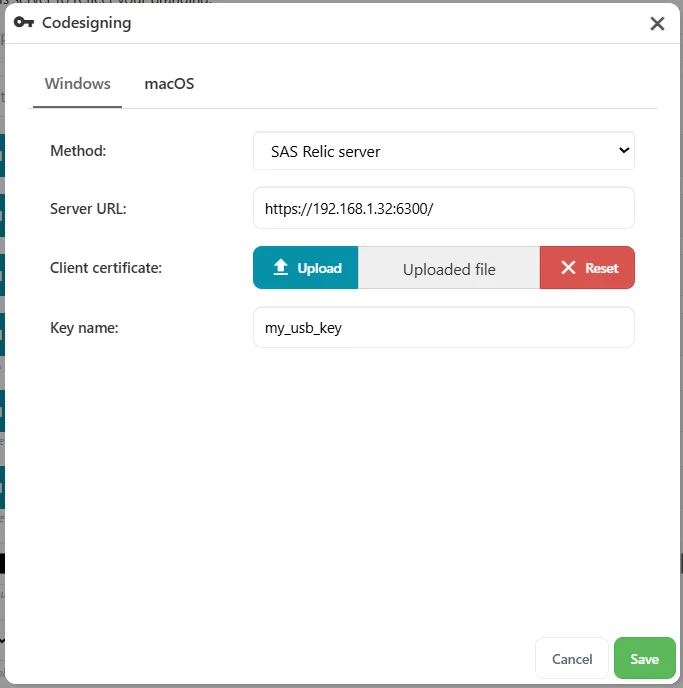
SAS Relic codesigning
SAS Relic is now supported as a remote server for codesigning Windows clients.
Ukrainian translation
Comet now features a Ukrainian (Українська мова) language translation.
Option to enable user home directory sandboxing on Linux
Linux users now have the option to enable sandboxing of user home directories, with Comet backing up each home directory data as the owner of that directory and thus ensuring that permissions and ACLs are fully respected.
Support shared quotas across multiple Storage Vaults
Comet 25.9.7 brings initial support for sharing quotas between multiple Storage Vaults, allowing for more flexible storage offerings.
Enhancements
Added support for the new Wasabi US West 2 (San Jose) region
In Comet 25.9.2, Wasabi users can now configure buckets for Wasabi's new US West 2 (San Jose) region.
Improved the performance of Comet user APIs, particularly when the server is under load
Comet 25.9.5 brings substantial under-the-hood improvements to the performance of APIs used in regular activities, reducing load on busy servers and increasing throughput of short-lived backup jobs.
Support for running multiple commands in a Program Output Protected Item
Multiple streams of program output can now be combined into a single program output Protected Item, each with an assigned file name to be used upon restore, allowing for related sets of data to be configured and scheduled in unison.
Tags for custom backup jobs
Custom backup jobs started via the API can now have tags specified, allowing these jobs to be identified and retrieved by tag through the job history search in the Management Console and through the API.
Added APIs to get, update and delete Protected Items
API users can now get, update, and delete Protected Items in isolation, without having to interact with the rest of the user profile.
Configure Proxmox Changed Block Tracking in Comet Backup Desktop App
Changed Block Tracking can now be selected for Proxmox backups via the Comet Backup desktop app
Visually See Offline Proxmox Nodes
The Proxmox Protected Item now displays offline nodes with clear visual indicator in the items window. This improvements makes it significantly easier to understand the status of nodes in your Proxmox Cluster.
Changes compared to 25.9.11
Bug Fixes
- Fixed an issue with unable to parse Proxmox storage names with upper-case letters
- Fixed an issue where the Proxmox PI Web UI incorrectly rendered expand/collapse controls on leaf items
- Fixed an issue with displaying EBR volumes at the time of granular restore
- Fixed a cosmetic issue with outdated EULA text when installing the self-hosted Comet Core for Windows